A few months ago, I spoke to two Project Managers. Both had almost the same experience, similar roles, and even worked in comparable industries.
But their situations were completely different. One was struggling to get interviews despite applying consistently. The other had multiple offers and was negotiating salaries.
One thing I understood was that the difference wasn’t luck; it was alignment with where the market is heading.
In 2026, being a Project Manager is no longer just about tracking tasks or managing timelines. It’s about handling fast-moving teams, working with agile and digital tools, and delivering measurable business impact. Companies in 2026 are hiring for capability and execution.
In this blog, we will discuss the Project Manager Job Market, the hiring trends, industry demand, and skill gaps. If you’re serious about growing as a Project Manager, this will help you understand where you stand today and what you need to change to stay relevant.
Project Manager Job Market 2026: Overview
The Project Manager job market in 2026 is growing, but not evenly. Companies are still hiring, but they are far more selective about skills, adaptability, and real execution ability. The shift is clear. Businesses want problem-solvers who can deliver outcomes.
Across the US, India, and global markets, hiring is being driven by Digital transformation, such as AI, SaaS, and automation. These industries have faster product delivery cycles, cost efficiency, and lean teams. This means Project Managers today must be agile-ready, tech-aware, and comfortable managing distributed teams.
Where Project Manager hiring is growing vs declining
Most high-growth companies are expanding their Project Management teams due to increasing project complexity and faster delivery expectations. In 2026, hiring is growing rapidly across tech and SaaS companies. This is because continuous product releases demand for agile Project Managers.
For Fintech and AI-driven businesses that require structured execution and speed. Consulting and IT services firms are also hiring actively to manage multiple global clients.
However, Global Capability Centers (GCCs), especially in India, are driving strong demand for Project Managers handling international projects.
Where hiring is slowing or changing
At the same time, hiring is slowing or evolving in traditional sectors. Manufacturing roles without digital transformation are seeing limited demand, and hiring is mostly tied to automation initiatives. Construction and other non-tech industries continue to offer stable but slower growth opportunities.
Additionally, organizations relying only on waterfall methodologies are reducing demand for rigid, documentation-heavy Project Managers, as companies shift toward more flexible and agile ways of working.
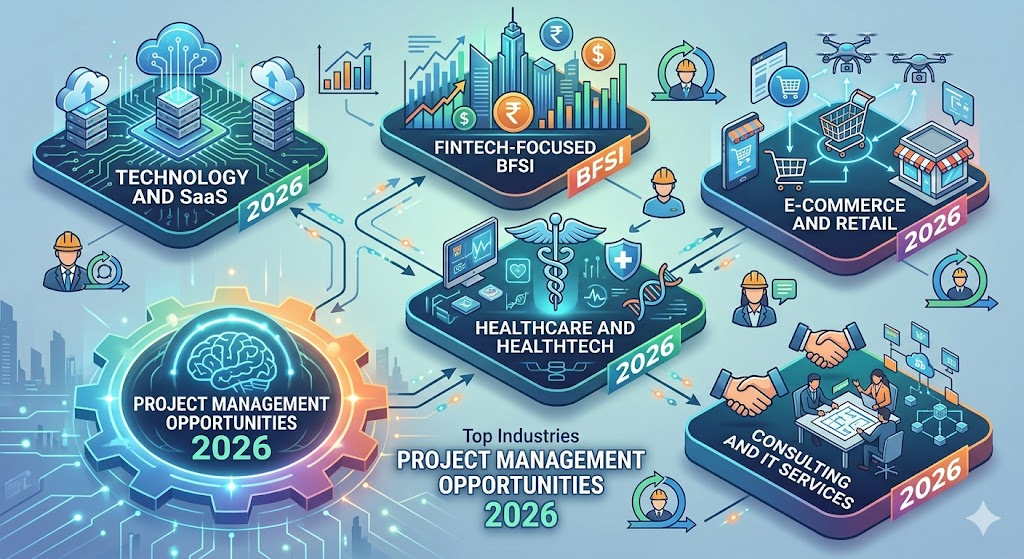
Top industries hiring Project Managers in 2026
A few years back, it was said that Project Managers are only needed in the IT sector. However, in 2026, they are hired across multiple industries. Let’s see some of the top hiring sectors:
Technology and SaaS: Manage product delivery, sprint execution, and cross-functional team coordination in fast-paced agile environments.
Fintech-focused BFSI: Handle compliance-driven projects while driving digital banking and fintech innovation initiatives.
Healthcare and HealthTech: Oversee digital health systems, hospital operations, and data-driven healthcare solutions with high accuracy.
E-commerce and Retail: Drive supply chain efficiency, logistics, and customer experience improvements across operations.
Consulting and IT Services: Manage multi-client projects, global teams, and large-scale delivery with strong stakeholder coordination.
Project Manager Skills in Demand in 2026
In 2026, Project Management is no longer just about timelines, meetings, and reports. The role has evolved into a strategic, tech-enabled, and outcome-driven function. Companies now look for Project Managers who can think beyond execution, use data and AI, and lead teams in fast-changing environments.
1. Agile and Hybrid Project Management
Companies are moving away from strict waterfall models and adopting agile + hybrid approaches. PMs must be comfortable with sprint cycles, fast feedback loops, and flexible execution.
2. AI and Data-Driven Decision Making
AI is becoming a core part of Project Management. From predicting risks to optimizing timelines. PMs who can use AI tools and interpret data for decisions have a clear advantage.
3. Strategic Thinking and Business Acumen
Project Managers are no longer just executors in 2026. They are expected to align projects with business goals and drive measurable impact.
4. Communication and Stakeholder Management
Managing clients, teams, and leadership across locations requires clear communication and strong stakeholder handling, still one of the most critical skills.
5. Leadership and Emotional Intelligence (EQ)
With remote and cross-functional teams, PMs need empathy, conflict resolution, and team motivation skills to manage people effectively.
6. Adaptability and Problem-Solving
Projects today are unpredictable. Companies want PMs who can handle uncertainty, adapt quickly, and solve problems without a fixed playbook.
7. Core Project Management Fundamentals
Basics still matter. Skills like planning, risk management, budgeting, and resource allocation remain essential for execution.
Get certified, get skilled, and get hired faster in top companies with our Scrum Master Bootcamp now!
Project Manager Hiring Trends in 2026
Project Manager hiring in 2026 is becoming more skill-driven, technology-focused, and outcome-oriented. Companies are prioritizing real execution ability, adaptability, and business impact. The rise of AI, agile methodologies, and global teams has reshaped what employers expect from Project Managers.
Profiles getting hired faster in the US and global market
In 2026, certain Project Manager profiles are moving faster through hiring pipelines.
PMs with agile and hybrid experience are preferred over traditional-only backgrounds
Candidates with AI and data-driven decision-making skills stand out
Professionals with cross-functional exposure, like tech and business, are getting shortlisted faster
PMs who can manage remote/global teams are in high demand
Modern projects are complex, fast, and tech-enabling. That is why companies need PMs who can adapt quickly and deliver measurable outcomes, not just manage timelines.
Why PMP-only candidates are losing ground in agile environments
Companies are shifting toward agile and hybrid methodologies instead of pure waterfall. Agile skills like Scrum, Kanban, and SAFe® are becoming mandatory in many roles.
PMP focuses more on structured planning, while modern teams need flexibility and speed. PMP needs to be combined with agile knowledge and practical experience.
Resume mistakes that reduce interview callbacks
Employers now prefer proof of work and real impact over job titles or years of experience. Even strong candidates are missing opportunities due to avoidable mistakes.
Writing task-based resumes instead of outcome-based achievements
Not highlighting tools, certifications, or agile experience clearly
Using generic resumes without tailoring for specific roles
Failing to show measurable impact, such as cost savings, time reduction, and delivery success
Remote vs On-Site Project Manager Jobs
Remote Project Management has become a standard way of working in 2026. On-site roles still exist, especially in industries like construction or manufacturing. However, many companies now prefer remote Project Managers.
They need one who can handle distributed teams, manage work digitally, and deliver results without being physically present. The core responsibilities remain the same, but remote roles demand stronger ownership, better communication, and higher adaptability.
What employers expect from remote Project Managers
Remote Project Managers are expected to go beyond traditional responsibilities and adapt to a more digital, self-driven environment.
Clear communication and strong stakeholder management across teams
Ability to plan, execute, and track projects independently
Experience in managing distributed teams across locations and time zones
Proficiency in Project Management and collaboration tools
High level of ownership, accountability, and self-discipline
Ability to identify risks early and ensure timely project delivery
Project Management Certifications in 2026
In 2026, certifications matter, but only when backed by real skills. Companies now prefer certifications that reflect agile thinking, scalability, and practical execution, rather than just theoretical knowledge.
Why SAFe® certified professionals are in high demand
As organizations scale and manage multiple agile teams, frameworks like SAFe® (Scaled Agile Framework) are becoming more relevant. This is why SAFe®-certified professionals are moving faster through hiring pipelines.
Companies need PMs who can manage large-scale agile environments, not just single teams
SAFe® helps in aligning multiple teams, stakeholders, and business goals
It is highly valued in enterprise companies, consulting firms, and GCCs
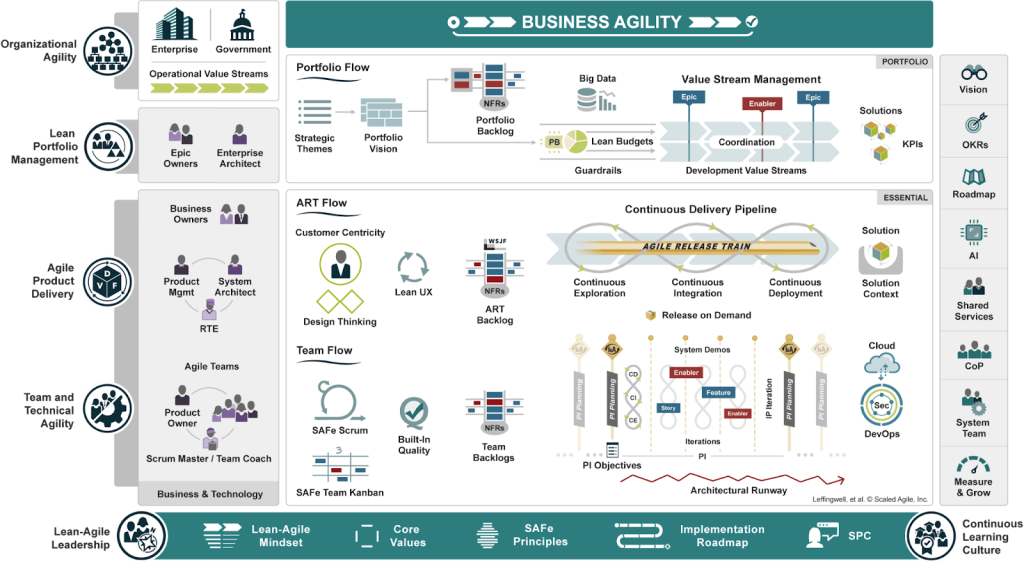
To understand how it works across teams and organizations, you can explore the SAFe Big Picture.
Choosing between Leading SAFe®, PMP, and PMI-ACP
Choosing the right certification depends on your career stage and the type of roles you’re targeting.
If you’re exploring options or unsure where to start, you can review different SAFe® Courses to understand which certification aligns best with your goals.
Project Manager Salary in 2026
The biggest trend for the Project Manager Salary in 2026 is clear. PMs with agile expertise, certifications, and tech exposure are earning higher salaries compared to traditional roles. Companies are willing to pay a premium for professionals who can drive outcomes and manage complex, fast-paced projects.
Salary ranges by experience level
Salaries are higher in tech hubs and roles involving product, AI, and large-scale Project Management.
Salary premium for agile and SAFe®-certified Project Managers
Many professionals also explore roles like Scrum Master, SAFe®-certified PM, or Agile PM to grow further. Understanding the difference between their salaries and roles can help you choose the right path. You can also read on Agile Coach vs Scrum Master to get a clear career path.
Agile skills improve delivery speed and efficiency
Certifications signal lower risk to employers
Enterprise frameworks like SAFe® enable multi-team and large-scale execution
For professionals targeting high-paying roles, certifications like the Leading SAFe® 6.0 certification training can significantly boost earning potential.
Project Management Tools You Must Know in 2026
In 2026, Project Management is highly tool-driven. Companies expect PMs to be comfortable with task tracking, collaboration, and reporting tools to manage projects efficiently. In large-scale agile environments, understanding Scaled Agile Framework Tools also becomes important.
Common tools used by Project Managers:
Jira / ClickUp / Asana: Task and sprint management
Microsoft Project / Smartsheet: Planning and scheduling
Slack / Microsoft Teams: Team communication
Confluence / Notion: Documentation and knowledge sharing
Power BI / Excel: Reporting and data tracking
Why tool expertise improves hiring chances
In 2026, tool expertise is a key hiring factor because it shows that you can execute projects efficiently from day one. Companies prefer candidates who are already familiar with tools like Jira, Asana, or Slack, as it reduces training time and improves team collaboration.
Simply put, tool knowledge signals that you can handle real-world project environments, not just theoretical concepts.
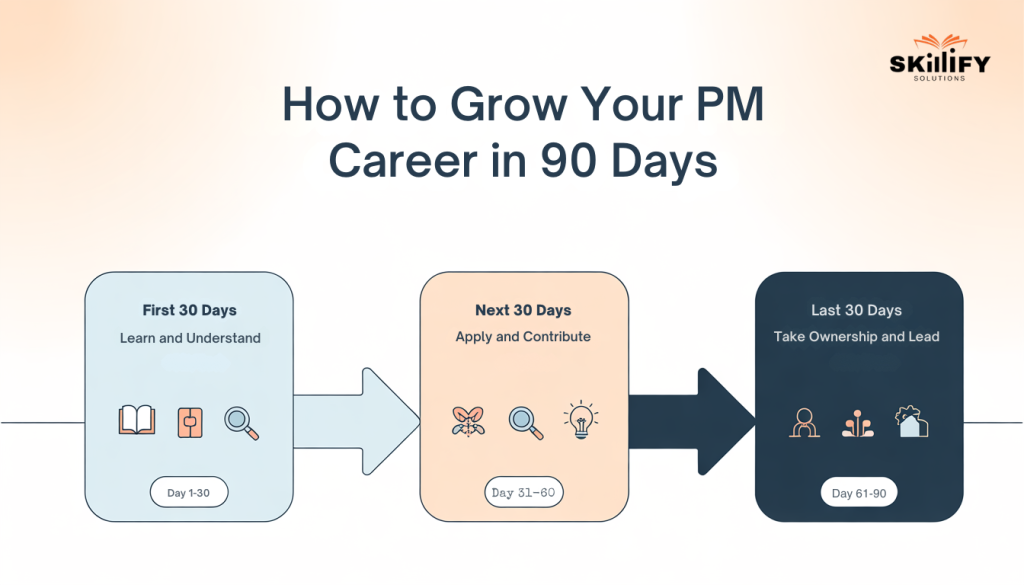
How to Grow Your PM Career in the Next 90 Days
The next 90 days can completely change your Project Management career if you approach it with a clear plan. A structured 30-60-90-day approach helps you build skills, close gaps, and show measurable progress quickly.
Here is a simple guide:
First 30 days: Learn and understand
Next 30 days: Apply and contribute
Final 30 days: Take ownership and lead
Certifications and resume strategies that deliver fast results
To see real growth in 90 days, focus on high-impact actions:
Learn one in-demand certification, like SAFe® or Scrum Master
Update your resume with outcome-based achievements
Gain hands-on exposure to tools like Jira, Asana, or ClickUp
Build a project portfolio or case study to showcase execution
Start applying with a targeted, role-specific resume
If you want structured learning, programs like SAFe for Teams training can help you become job-ready faster.
How Skillify Solutions helps Project Managers get job-ready
Platforms like Skillify Solutions focus on making Project Managers industry-ready, not just certified.
Industry-relevant certifications aligned with hiring demand
Practical training focused on real-world project scenarios
Guidance on resume building and interview preparation
Support to transition into high-demand agile and enterprise roles
For execution-level and team-based roles, programs like SAFe® for Teams training help you understand how agile teams work, collaborate across functions, and deliver value in real projects.
If you use the next 90 days with the right strategy, you can significantly improve your skills, profile, and hiring chances in a short time.
Conclusion
From the above blog, we can conclude that 2026 is a turning point for Project Managers. The role is becoming more dynamic, more strategic, and more rewarding for those who are ready to adapt. Whether it’s learning new tools, understanding agile frameworks, or improving how you present your experience, small changes can create a big impact.
The gap between average and high-performing project managers is growing, but so are the opportunities. If you take the right steps now, you won’t just stay relevant, you’ll grow faster than most. The choice is simple: evolve with the market or get left behind.
1. Is Project Management still a good career in 2026?
Yes, project management is still a strong career in 2026. Demand is growing due to digital transformation, AI adoption, and global projects requiring skilled managers.
2. Are project managers in demand in the US right now?
Yes, project managers are in high demand in the US. Companies need professionals to manage complex, cross-functional projects across industries like tech, healthcare, and finance.
3. Which certification is best for project managers in 2026?
The best certification depends on your role. SAFe® Courses by Skillify Solutions are widely recognized. While Agile and PMP certifications are preferred for modern, fast-paced and scalable project environments.
4. Does SAFe certification increase salary for project managers?
Yes, certifications like SAFe® and PMP can increase salary. PMP-certified professionals earn around 17% higher median salaries than non-certified peers.
5. What industries hire the most project managers?
Top industries include IT & SaaS, finance (BFSI), healthcare, construction, and consulting, as they rely heavily on structured project execution.
We all have seen a pattern lately. More people are becoming Scrum Masters, but fewer are getting hired. Do you know the reason for this? It is because the role has evolved in 2026.
Now, the trend has changed. Companies don’t just want someone who can run stand-ups or manage sprints. They want someone who can handle teams, align stakeholders, and actually improve delivery. At the same time, the market is growing fast, and Agile adoption is expanding across industries.
So yes, the opportunity is real, but so is the competition.
This blog will break down everything you need to know about Scrum Master Jobs. All from demand, salary, skills, certifications, and most importantly, what actually gets you hired. If you’re planning to enter this field or grow in it, this will give you a clear, practical direction. Read on to know more!
<H2> Are Scrum Master Jobs Still in Demand in 2026?
Yes, Scrum Master jobs are still very much in demand in 2026, and in many cases, the demand is actually growing. As companies continue to move towards Agile ways of working, the need for someone who can manage teams, remove blockers, and ensure smooth delivery has become critical.
Earlier, Agile was largely limited to tech companies, but today it has expanded across industries such as finance, healthcare, retail, and even traditional businesses. This shift has made the Scrum Master a key role in helping teams stay aligned, productive, and fast-moving.
The demand is being driven by:
More companies are adopting Agile across industries
The need for faster decision-making and product releases
Growing complexity in managing cross-functional teams
In fact, job growth for Scrum Masters is projected to grow by around 24% by 2026, which is significantly higher than many other roles. If you’re exploring structured ways to get started, programs like a Scrum Master Bootcamp can help you move faster with guided learning and real-world scenarios.
<H3> Job Market Demand and Competition for Scrum Masters
The demand for Scrum Masters in 2026 remains strong, as it has been over the last few years. But in 2026, competition has increased, especially at the entry level.
Scrum Master roles are growing at 24% by 2026, much faster than many other jobs
Agile adoption is expanding beyond tech into finance, healthcare, and startups
More candidates are entering through certifications, and thus, the beginner roles are crowded
Companies now prefer practical experience over just certifications
There’s still a shortage of experienced Scrum Masters, which creates a high-paying opportunity
Learn Scrum the right way with real projects, not just theory, with our Scrum Master Bootcamp today!
<H2> Scrum Master Salary in 2026: Complete Breakdown
As companies rely more on Agile teams for faster delivery, they are willing to pay a premium for Scrum Masters who can improve team performance and drive results.
<H3> Entry-Level Scrum Master Salary
Entry-level roles require basic Agile knowledge and certification, such as Scrum Master Bootcamps. However, hands-on project exposure can significantly improve offers.
Experienced professionals handling multiple teams or Agile transformation often move into higher-paying leadership roles.
This is why Scrum Master is often considered one of the best Non-technical Jobs in IT for professionals transitioning from operations, support, or management roles.
<H2> Top Skills You Need to Become a Scrum Master in 2026
The role of a Scrum Master in 2026 is no longer limited to running stand-ups or managing sprints. It has evolved into a mix of technology, leadership, and business impact.
Today’s Scrum Master operates at the intersection of people, processes, and tools. It balances team coaching with data-driven decision-making and AI-enabled workflows
<H3> Agile Tools and AI-Driven Workflow Skills
In 2026, being comfortable with Agile tools and AI is a core requirement. Tools like Jira, Trello, and ClickUp help manage backlogs, track sprints, and improve team visibility
Data-driven decision-making is one of the important metrics you must know. Scrum Masters are expected to analyze metrics like sprint velocity, cycle time, and team performance
AI integration and tools are now used for:
Predicting sprint outcomes
Automating repetitive tasks
Identifying risks and bottlenecks
Building these skills on your own can take time. That is why many professionals choose hands-on programs like the Scrum Master Bootcamp that focus on real projects, tools, and team scenarios.
<H3> Communication and Stakeholder Management Skills
While tools matter, the real differentiator is how well you handle people.
Ability to align developers, product teams, and leadership
Managing expectations across business, tech, and leadership teams
Understanding team dynamics, resolving conflicts, and building trust
Running effective meetings, removing blockers, and keeping teams focused
<H2> CSM vs SSM vs SAFe®: Which Scrum Certification is Best in 2026?
Choosing the right Scrum certification in 2026 depends on your experience level and career goals. Certifications help you get shortlisted, but skills and real-world experience ultimately decide hiring. Let’s find out the difference:
<H3> Best Certification Based on Your Experience Level
<H3> Which Certification Helps You Get Hired Faster
When it comes to getting hired quickly, CSM usually has an advantage because it is widely recognized and commonly listed in job requirements, especially for entry-level roles. It helps candidates get shortlisted faster due to their popularity and accessibility.
However, a Certified Scrum Master can stand out in interviews, as it demonstrates a stronger conceptual understanding of Scrum. Some companies prefer them because of their exam-based validation.
For larger organizations and higher-level roles, SAFe® certification can significantly improve your chances, as companies working at scale actively look for professionals who understand Agile frameworks beyond a single team. To know more, read our guide on What is SAFe® certification in detail and opt for the best roles in 2026.
<H2> How to Become a Scrum Master in 2026
Becoming a Scrum Master in 2026 does require the right focus. Here are the 5 core things you need to get right:
Build Strong Agile and Scrum Fundamentals and understand how Scrum works in real teams. Start with sprints, stand-ups, backlog, and retrospectives.
Gain Practical Experience and work on real or mock projects to show you can apply Scrum, not just explain it.
Get a Relevant Certification through SAFe® Training Programs that can help you get shortlisted, but they should support your practical knowledge.
Developing communication and Team Handling Skills to manage people, resolve conflicts, and align teams is critical.
Use tools like Jira, show measurable impact in your resume, and apply smartly, even through related roles if needed.
If you want a more detailed explanation, it’s worth exploring a complete guide on How to Become a Scrum Master, where each stage is broken down more clearly. This can help you understand what to learn first, how to choose the right certification, how to gain practical experience, what tools to focus on, and how to apply for roles with more confidence.
Step into enterprise Agile roles with practical SAFe® Courses and enhance your skills now!
<H2> How to Build a Strong Scrum Master Resume in 2026
<H3> Resume and LinkedIn Optimization Tips
Your resume and LinkedIn should clearly reflect your Scrum expertise and achievements in a simple, result-driven way.
Use metrics and insights to prove results
Words like facilitated, implemented, led, and improved make your profile more powerful
Align your resume with the job description to pass ATS filters
Mention team size, tools used, and problems solved
Instead of just communication, show where you used it in real scenarios
Use simple formatting and keep clear headings
<H3> Keywords Recruiters Are Looking for in 2026
Recruiters and ATS systems rely heavily on keywords to shortlist candidates. If your resume doesn’t include them, it may never be seen.
<H4> Core Scrum Keywords
Scrum, Agile Methodologies, Kanban
Sprint Planning, Daily Standup, Retrospective
Backlog Refinement, User Stories, Product Backlog
<H4> Tools and Technical Keywords
Jira, Confluence, Azure DevOps, Trello
Agile Metrics, Velocity Tracking, Burndown Charts
<H4> Skills and Responsibilities Keywords
Team Facilitation, Stakeholder Management
Impediment Removal, Agile Coaching
Cross-functional Collaboration, Risk Management
With experience, many Scrum Masters move into higher roles like Agile Coach. If you’re exploring this path, understanding the difference between an Agile Coach vs Scrum Mastercan help you plan your growth better.
<H2> Common Mistakes That Stop You from Getting a Scrum Master Job
Many candidates struggle to land a Scrum Master role. This is not because of a lack of demand, but because of avoidable mistakes in approach, skills, and positioning. In 2026, companies are hiring people who can actually lead teams and deliver outcomes.
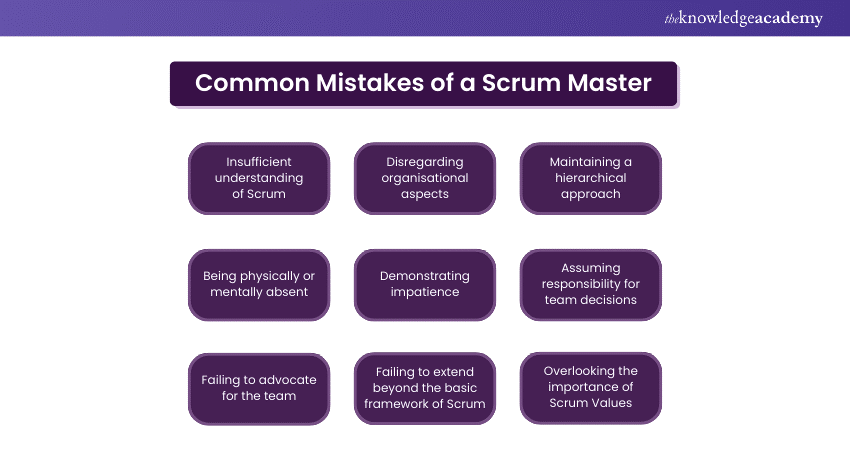
Here are the most common mistakes that hold candidates back:
<H3> Relying only on certification: Many candidates believe getting a certification is enough, but companies now expect practical experience and real-world application.
Fix: Show projects, internships, or real Agile exposure.
<H3> Waiting for the job title to gain experience: A common mistake is thinking you can only act as a Scrum Master after getting the role.
Fix: Start practicing Scrum in your current role. You can run meetings, manage tasks, or help teams improve.
<H3> Not understanding the real role of a Scrum Master: Many candidates treat it like a project manager or assistant role, which is incorrect.
Fix: Focus on being a facilitator and coach, not someone who controls or executes tasks.
<H3> Lack of communication and stakeholder skills: Technical knowledge alone isn’t enough; most failures happen due to poor communication and misalignment.
Fix: Build skills in conflict resolution, team alignment, and stakeholder handling.
<H3> Not showing a measurable impact in the resume: Generic resumes with no numbers or outcomes fail to stand out.
Fix: Add results like “improved sprint delivery by 20%” instead of listing responsibilities.
<H3> Trying to do everything instead of empowering the team: Acting as the team’s problem-solver or assistant reduces team ownership and shows a poor understanding of Scrum.
Fix: Guide the team to solve problems, don’t solve everything yourself.
<H3> Ignoring the Agile mindset and focusing only on the process: Following rituals like stand-ups and sprints without understanding Agile principles leads to poor performance.
Fix: Focus on outcomes like team efficiency, collaboration, and continuous improvement.
<H2> Conclusion
Scrum Master roles in 2026 offer strong demand, good salaries, and long-term growth. But the market is no longer about just certifications. Companies are looking for professionals who can manage teams, solve problems, and deliver real results.
If you focus on building practical experience, improving communication skills, and understanding how Agile works in real scenarios, you can stand out easily.
You can start with small steps, work on real projects, and keep learning continuously. The path is clear, but execution matters the most. If you stay consistent and focused, becoming a successful Scrum Master is completely achievable.
Why am I not getting Scrum Master interview calls even after certification?
Most companies look beyond certification. If your resume lacks real project experience, measurable impact, or relevant keywords, it becomes hard to get shortlisted. Focus on showing practical work, not just certificates.
Do companies hire Scrum Masters without a technical background in 2026?
Yes, many companies hire non-technical professionals as Scrum Masters. The role focuses more on team management, communication, and Agile processes rather than coding skills.
Is AI reducing Scrum Master job opportunities in 2026?
No, AI is not reducing demand. Instead, it is changing the role by automating repetitive tasks and allowing Scrum Masters to focus more on strategy, team performance, and decision-making.
Can AI replace Scrum Masters completely in the future?
AI cannot fully replace Scrum Masters because the role involves human skills like leadership, conflict resolution, and team motivation, which require emotional intelligence.
What new AI-related skills should Scrum Masters learn?
Scrum Masters should learn how to use AI tools for data analysis, sprint prediction, workflow automation, and performance tracking to improve team efficiency.
Data is everywhere today. But I will ask you a real question. Are you just looking at data, or actually using it to make decisions?
This is where the gap between Business Intelligence and Data Science becomes important.
I’ve seen businesses track hundreds of metrics on dashboards. It can be sales, attendance, revenue, churn and others. However, they still struggle to answer simple questions like why growth is slowing or what to do next.
At the same time, I’ve seen teams use the same data to forecast demand, optimize pricing, reduce costs, and stay ahead of competitors. Here is the difference.
Business Intelligence helps you understand what has already happened through reports and dashboards. Data Science goes deeper and helps you predict what will happen next using models and algorithms.
In this blog, we’ll break down Business Intelligence vs Data Science in the simplest way possible. We will study what they mean, how they differ, real-world use cases, and which path makes the most sense for you in 2026. Read on to know more!
Business Intelligence vs Data Science: A Detailed Comparison
Businesses today generate a huge amounts of data every day. However, raw data alone does not create value. Companies need the right methods and technologies to turn data into meaningful insights that support decision-making. This is where Business Intelligence (BI) and Data Science play an important role.
While both fields work with data, their goals, techniques, and outcomes are different. Business Intelligence focuses on understanding what has already happened in the business.
However, Data Science focuses on predicting what could happen in the future using advanced analytics and machine learning. The table below explains the core differences between Business Intelligence and Data Science in a simple and structured way.
Criteria
Business Intelligence
Data Science
Primary Focus
Analyzes past business data for reporting and decisions
Finds patterns and predicts future outcomes
Time Orientation
Focuses on past and present data
Focuses on future predictions
Key Questions
What happened? Why did it happen?
What will happen next? What should we do?
Data Types
Structured data from databases and business systems
Structured and unstructured data like text, images, and logs
Data Volume
Medium to large datasets
Very large and complex datasets
Technical Complexity
Moderate technical skills
High technical skills and programming
Methods Used
Reporting, dashboards, and data visualization
Machine learning, statistics, and AI models
Tools
Power BI, Tableau, Excel, Looker
Python, R, TensorFlow, Spark
Deliverables
Reports, dashboards, KPI tracking
Predictive models and automated insights
Implementation Time
Faster to implement
Takes longer due to model building
Flexibility
Structured and predefined reports
Flexible and experimental analysis
Business Value
Tracks business performance
Predicts trends and supports strategy
Key Differences Between Business Intelligence and Data Science
The key difference between Business Intelligence and Data Science starts with their focus and how they will help you perform your daily work. Business Intelligence focuses more on data interpretation, reporting, and visualization, while Data Science requires advanced analytical skills, programming knowledge, and statistical modeling to build predictive systems.
Below are the core areas where these two fields differ.
Skills and Technical Requirements
Business Intelligence professionals typically focus on analyzing business data and presenting insights in a clear and understandable format. Their work involves creating dashboards, generating reports, and helping management make data-driven decisions.
Key skills for Business Intelligence roles include:
Data visualization and dashboard creation
SQL and database management
Business analysis and Key Performance Index (KPI) tracking
Reporting and data interpretation
Knowledge of BI tools such as Power BI or Tableau
Data Science roles require a strong technical and analytical background. Data scientists work with large datasets, build predictive models, and use machine learning algorithms to discover patterns in data.
Key skills for Data Science roles include:
Programming languages such as Python or R
Statistics and probability
Machine learning and predictive modeling
Data cleaning and preprocessing
Big data technologies and algorithms
In simple terms, BI professionals focus more on business insights, while data scientists focus more on advanced analytics and predictive modeling. If you’re starting from scratch, learning all these skills on your own can feel overwhelming.
This is where structured learning paths like a Data Science Bootcamp help you move faster with guided projects, mentorship, and industry-relevant tools.
Tools and Technologies Comparison
Another major difference between Business Intelligence and Data Science lies in the tools and technologies used.
Business Intelligence tools are mainly designed to analyze historical data and present it visually through dashboards and reports. These tools help business teams quickly understand trends and performance metrics.
Common Business Intelligence tools include:
Microsoft Power BI
Tableau
QlikView and Qlik Sense
Looker
Microsoft Excel
Data Science tools are more programming-focused and used for complex data analysis and machine learning.
Common Data Science tools include:
Python
R programming language
Jupyter Notebook
TensorFlow and PyTorch
Apache Spark
While BI tools prioritize ease of use and visualization, Data Science tools focus on advanced computation and model development.
Data Processing Methodologies
The way data is processed is also different in Business Intelligence and Data Science.
Business Intelligence generally works with structured and well-organized data stored in databases or data warehouses. BI systems use methods such as Extract, Transform, Load (ETL) to clean and organize data before generating reports and dashboards. A structured Business Analyst Bootcamp can help you define gaps and analyze the trends along with individual growth.
However, Data Science often deals with large and complex datasets, including unstructured data such as text, images, and logs. Data scientists use advanced techniques like data mining, machine learning algorithms, and statistical modeling to analyze and extract insights.
In BI workflows, the focus is on descriptive analytics, which explains what happened in the past. In Data Science workflows, the focus shifts toward predictive and prescriptive analytics. This helps businesses anticipate future outcomes and optimize decisions.
Together, Business Intelligence and Data Science complement each other, allowing organizations to understand past performance while also predicting future opportunities.
Business Intelligence vs Data Science Salary and Career Growth
Business Intelligence roles are often focused on reporting, dashboard creation, and performance monitoring, while Data Science roles focus on predictive modeling, machine learning, and advanced analytics.
Because Data Science requires deeper technical expertise, salaries in this field are often slightly higher. You can check out Data Science Bootcamp Salary according to the current industry standards to get a better understanding. However, BI roles also offer excellent growth opportunities, especially for professionals who understand both business operations and data analysis.
The table below gives a general overview of salary ranges and career growth for common roles in these fields.
Both Business Intelligence and Data Science are widely used across industries to improve decision-making, optimize operations, and drive innovation. While Business Intelligence helps organizations monitor performance and understand past trends, Data Science helps them predict future outcomes and uncover deeper insights from complex data.
Companies often use both approaches together to build a strong data-driven strategy. Below are some common industry applications for Business Intelligence and Data Science.
Business Intelligence Applications by Industry
Business Intelligence is commonly used to analyze business performance, generate reports, and visualize key metrics. BI tools help managers and executives quickly understand what is happening within their organizations.
1. Retail and E-commerce
Retail companies use BI dashboards to track sales performance, inventory levels, customer purchases, and product demand. This helps businesses manage stock efficiently and identify best-selling products.
2. Finance and Banking
Banks and financial institutions rely on BI tools to monitor transactions, track financial performance, detect unusual patterns, and generate regulatory reports. BI also helps analyze customer behavior and service performance.
3. Healthcare
Hospitals and healthcare organizations use Business Intelligence to analyze patient data, hospital resource usage, treatment outcomes, and operational efficiency. BI dashboards help administrators improve healthcare management.
4. Manufacturing
Manufacturers use BI systems to monitor production metrics, supply chain performance, equipment utilization, and operational efficiency. This helps companies reduce downtime and improve productivity.
5. Marketing and Sales
BI tools help businesses analyze campaign performance, customer acquisition data, sales trends, and regional performance. Marketing teams use these insights to optimize strategies and improve ROI.
Gain practical Business skills and accelerate your career growth today with our Business Analyst Bootcamp today!
Data Science Applications by Industry
Data Science goes beyond reporting and focuses on advanced analytics, predictive modeling, and automation. Organizations use data science techniques to discover patterns, forecast trends, and build intelligent systems.
1. E-commerce and Online Platforms
Companies use data science to build recommendation systems that suggest products to customers based on browsing and purchase behavior. Platforms like Amazon and Netflix rely heavily on predictive algorithms.
2. Finance and Fraud Detection
Data science models analyze large volumes of financial transactions to detect fraud, predict credit risk, and automate investment decisions. Machine learning algorithms can identify suspicious activities in real time.
3. Healthcare and Medical Research
Data science is used to predict disease risks, analyze medical images, and support drug discovery. Machine learning models can help doctors detect health conditions earlier and improve treatment outcomes.
4. Transportation and Logistics
Logistics companies use predictive analytics to optimize delivery routes, forecast demand, and reduce operational costs. Data science also supports autonomous vehicles and intelligent transportation systems.
5. Marketing and Customer Analytics
Businesses use data science to analyze customer behavior, predict churn, personalize marketing campaigns, and optimize pricing strategies. This allows companies to create more targeted and effective marketing efforts.
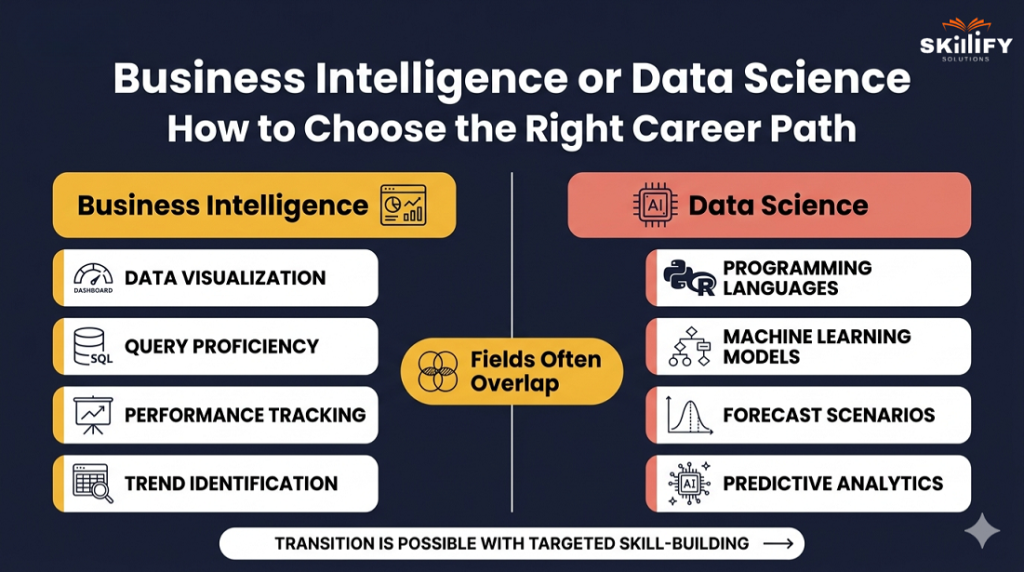
Business Intelligence or Data Science: How to Choose the Right Career Path
If you enjoy working closely with business teams, creating dashboards, and turning data into clear visual insights, Business Intelligence may be the right path for you. BI professionals focus on analyzing historical data, building reports, and helping organizations track performance through metrics and dashboards. This role is ideal for people who enjoy data interpretation, business strategy, and communication.
On the other hand, Data Science is better suited for individuals who enjoy deep technical work, programming, and solving complex analytical problems. Data scientists work with large datasets, build machine learning models, and develop algorithms that help predict future trends.
If you are interested in statistics, artificial intelligence, and advanced analytics, Data Science can be a highly rewarding career path.
Here are a few simple factors to consider when choosing between the two fields:
Choose Business Intelligence if you:
Enjoy working with dashboards and data visualization
Prefer solving business problems using data insights
Like working closely with management and decision-makers
Have skills in SQL, reporting tools, and analytics platforms
Choose Data Science if you:
Enjoy programming and building predictive models
Are interested in machine learning and artificial intelligence
Like working with complex datasets and statistical analysis
Have strong skills in Python, R, mathematics, or algorithms
It is also important to note that the two fields often overlap. Many professionals begin their careers in Business Intelligence or Data Analytics and later move into Data Science as they develop stronger technical skills. Here studying the Data Analyst vs Data Scientist Salary can help you take better career decisions and choose the best one.
Conclusion
From the above blog, we understood that Business Intelligence and Data Science are not competitors but complements.
Business Intelligence helps you understand your business clearly by showing what has happened and why. Data Science takes it a step further by helping you predict what will happen next and what actions to take.
In today’s data-driven world, companies that succeed are not the ones with the most data, but the ones that use it effectively. That’s why many organizations combine both, using BI for day-to-day decisions and Data Science for long-term strategy. That is why, platforms like Skillify Solutions offer structured bootcamps designed to help beginners become job-ready with real-world projects.
It is suggested to go for Business Intelligence if you enjoy analysis and storytelling with data. Choose Data Science if you enjoy programming, models, and solving complex problems. The key is to start, learn, and build real-world skills.
Upgrade your career with high demand business skills today with an on-demand Business Analyst Bootcamp now!
Frequently Asked Questions
1. Can business intelligence and data science work together in organizations?
Yes, both work together. Business Intelligence analyzes past data, while Data Science predicts future trends. Together, they help businesses make better decisions.
2. Which is easier to learn: business intelligence vs data science?
Business Intelligence is generally easier to learn. It requires less programming and focuses more on tools like Excel and dashboards. Data Science is more complex and needs coding and statistics.
3. Do I need a degree for business intelligence or data science careers?
Not always. Many people enter these fields through online courses, bootcamps, and practical projects. Skills and experience matter more than a degree.
4. Is business intelligence being replaced by data science?
No, Business Intelligence is not being replaced. Both are used together. BI helps understand past performance, while Data Science helps predict the future.
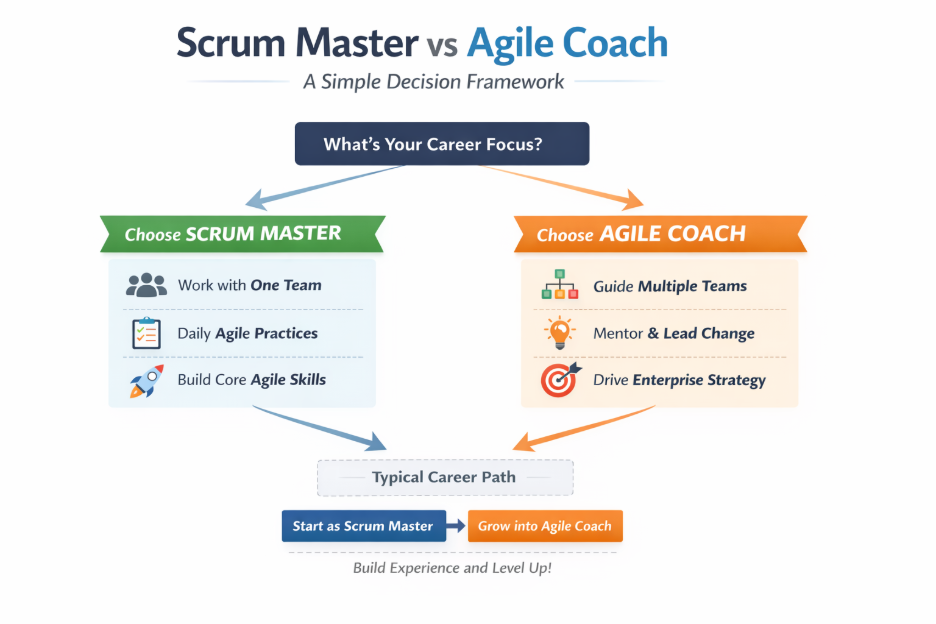
Firstly, we have a question for you. If you want to start a career or change your job role today, would your work be more like that of a Scrum Master or an Agile Coach?
Most people can’t answer that clearly. Because in reality, many Scrum Masters are already doing coaching work, but without the scope, authority, or salary of an Agile Coach. And many who aim for Agile Coach roles underestimate how different the responsibility actually is.
The gap between the two roles is not just about experience or certification. It’s about how you think, what problems you solve, and the level at which you operate.
I’ve seen people jump titles without growing into the role and struggling. I’ve also seen people quietly evolve into Agile Coaches and completely change their career trajectory.
In this blog, we’ll cut through the confusion between Agile Coach vs Scrum Master, with clear differences, real salary insights for 2026, and a practical path to move forward.
What is a Scrum Master: Role, Responsibilities and Day-to-day Work
A Scrum Master is the person responsible for making sure a team follows Agile and Scrum practices properly. You can think of them as a team-level coach who helps the team work better, removes blockers, and stays productive.
Their main goal is simple. It is to help the team deliver work smoothly without distractions. A Scrum Master works closely with one team, focusing on improving how that team performs every day.
Let’s see a day in the Life of a Scrum Master below:
9:30 AM: Joins daily stand-up, ensures everyone is aligned
11:00 AM: Works with a developer to resolve a blocker
1:00 PM: Syncs with Product Owner on sprint priorities
3:00 PM: Coaches team on improving sprint performance
5:00 PM: Prepares for retrospective and tracks improvements
If you’re planning to start your journey as a Scrum Master, structured learning can make a big difference. Programs like the Scrum Master Bootcamp are designed to give you practical, job-ready skills from day one.
What is an Agile Coach? Role, Responsibilities, and Daily Work
An Agile Coach works at a broader level compared to a Scrum Master. Instead of focusing on just one team, they help multiple teams and the entire organization adopt Agile.
You can think of them as a strategy-level guide who drives Agile transformation across the company. Their main goal is to make the whole organization more Agile, without focusing on only one particular team. Unlike Scrum Masters, Agile Coaches work across teams and leadership to create long-term changes.
Let’s see a day in the Life of an Agile Coach below:
10:00 AM – Meets leadership to align Agile strategy
12:00 PM – Runs a workshop on Agile practices
2:00 PM – Mentors Scrum Masters across teams
4:00 PM – Reviews organizational bottleneck
6:00 PM – Plans improvements for Agile transformation
Agile Coach vs Scrum Master: Key Differences Explained
While both roles are part of the Agile ecosystem, their scope, impact, and level of influence are very different. The biggest difference is simple. A Scrum Master focuses on one team, while an Agile Coach works across the entire organization. Here’s a clear side-by-side comparison:
Even though they have different roles, there is some overlap in what they do.
Where They Overlap
Both promote Agile principles and best practices
Both act as coaches and facilitators
Both help teams become more efficient and self-organized
Both aim to improve delivery and team performance
Where They Don’t
Scrum Masters work inside a team, Agile Coaches work across teams, and leadership
Scrum Masters focus on daily execution, Agile Coaches focus on long-term transformation
Scrum Masters follow the Scrum framework; however, Agile Coaches use multiple frameworks like Scrum, Kanban, SAFe®, and others.
Agile Coaches often mentor Scrum Masters, not the other way around
Learn, apply, and grow with structured SAFe® courses and build your future!
Agile Coach vs Scrum Master Salary in 2026
Agile Coach and Scrum Master salaries differ mainly due to their level of responsibility and impact. While Scrum Masters focus on improving team performance, Agile Coaches work at a broader level, driving change across the entire organization.
As a result, Agile Coaches typically earn higher salaries, especially as experience and leadership involvement increase. Here’s a quick comparison of their salaries in 2026:
Scrum Master vs Agile Coach: Which Career is Right for You?
Choosing between a Scrum Master and an Agile Coach depends on your experience, career goals, and the kind of impact you want to create. While both roles are part of the Agile ecosystem, they operate at very different levels, and the right choice comes down to what stage you are in your career.
When to Choose a Scrum Master?
If you enjoy working closely with a single team and solving day-to-day challenges, the Scrum Master role is the right fit. It focuses on improving team efficiency, running Agile ceremonies, and ensuring smooth delivery. This role is ideal for professionals who like structured environments and want to build a strong foundation in Agile practices.
When to Choose an Agile Coach?
If you are more interested in mentoring, influencing leadership, and driving change across multiple teams, the Agile Coach role is a better choice. It requires a broader perspective, where the focus is not just on execution but on transforming how the entire organization works. This role suits professionals who enjoy strategy, coaching, and long-term impact.
Not every Agile career moves towards coaching. Some choose Product Owner or Product Management roles based on their interest in business and customer outcomes. Structured programs like Product Management with AI Bootcamp can help you get started.
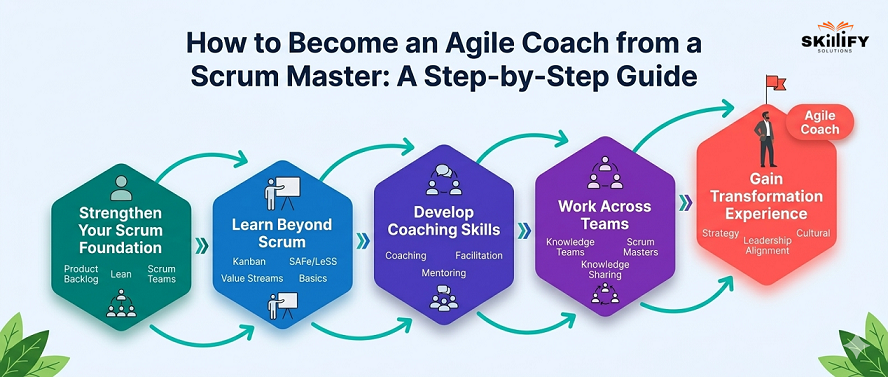
How to Become an Agile Coach from a Scrum Master: A Step-by-step Guide
Transitioning from a Scrum Master to an Agile Coach means moving from team execution to organization-level impact. Here’s a simplified path to help you make that shift:
Step 1: Strengthen Your Scrum Foundation
Go beyond just running ceremonies and focus on improving team performance, resolving conflicts, and enabling self-organization. Tip: Instead of just facilitating stand-ups, start identifying patterns (like repeated blockers) and help the team fix root causes.
Step 2: Learn Beyond Scrum
Agile Coaches are not limited to Scrum; they understand multiple frameworks like Kanban, Lean, and SAFe®. As you move beyond Scrum, learning frameworks like SAFe® become important, especially for large organizations.
Courses like Leading SAFe®, SAFe® Agile product management, or SAFe® Scrum Master training by Skillify Solutions can help you understand how Agile works at scale and prepare you for Agile Coach roles. As you prepare for senior roles like Agile Coach, interview expectations also change. Here are some important Project Management Interview Questions you should be ready for.
Step 3: Develop Coaching Skills
Shift your mindset from giving solutions to asking the right questions and guiding teams to find their own answers. Tip: Instead of telling a team what to do, ask questions like “What’s slowing you down?” or “What would improve this process?”
Step 4: Work Across Teams
Start expanding your scope by supporting multiple teams and mentoring other Scrum Masters. Example: Volunteer to help another team run retrospectives or share best practices across teams.
Step 5: Gain Transformation Experience
Agile Coaches drive change at a larger level, so they get involved in organizational improvements and transformation initiatives. Tip: Take ownership of a cross-team problem (like delayed releases) and work on improving the entire process.
Agile Coach vs Scrum Master in SAFe®: Key Differences Explained
In a SAFe® (Scaled Agile Framework) environment, both Scrum Masters and Agile Coaches operate within a larger, structured system where multiple teams work together. This shifts their roles from isolated team functions to aligned, cross-team collaboration and enterprise-level impact.
Scrum Master vs Agile Coach Roles in SAFe®
In SAFe®, a Scrum Master continues to support a single team but also becomes part of an Agile Release Train (ART). Their responsibilities expand to include coordination with other teams, participation in PI Planning, and ensuring alignment with program goals. The role is no longer just about team execution, but also about smooth collaboration across teams.
Agile Coaches, on the other hand, operate at a much broader level. They work across multiple teams or ARTs, guide leadership, and ensure that SAFe® practices are correctly implemented. Their focus is on scaling Agile, improving organizational alignment, and driving long-term transformation. You can also go through our guide on SAFe® Methodology to get a better understanding on how all these are interconnected with ecah other.
Key Differences and What it Means for Your Career
The difference between the two roles becomes more pronounced in SAFe®. Scrum Masters are focused on execution within the ART, while Agile Coaches focus on strategy, transformation, and enterprise agility.
For career growth, SAFe® environments provide a clear pathway. Scrum Masters get exposure to program-level activities and cross-team collaboration, which helps them gradually move into Agile Coach roles. This makes SAFe® one of the most practical environments to transition from team-level roles to organization-level leadership.
Conclusion
At first glance, Scrum Master and Agile Coach may look similar, but in reality, they serve very different purposes. One helps teams deliver better results every day, while the other focuses on improving how the entire organization works.
Understanding this difference is important, especially if you’re planning your next career move. Choosing the right path at the right time can accelerate your growth, while the wrong move can slow it down.
The good part is you don’t have to choose immediately. Most Agile Coaches begin their journey as Scrum Masters, building hands-on experience before stepping into a larger role.
Yes, in most cases, an Agile Coach is considered a more senior role. While a Scrum Master works with a single team, an Agile Coach operates at the organizational level and guides multiple teams and leaders.
2. Can a Scrum Master become an Agile Coach?
Absolutely. In fact, most Agile Coaches start their careers as Scrum Masters and grow into the role with experience and broader skills. We recommend building strong fundamentals first, then gradually expanding your scope.
3. How do Agile Coach and Scrum Master roles differ in non-IT industries?
The core difference remains the same even outside IT. Scrum Masters focus on improving team workflows, while Agile Coaches drive overall process and culture change across departments. Industries like manufacturing, healthcare, and retail also use Agile in similar ways.
4. How do Agile Coaches and Scrum Masters collaborate in a large-scale Agile transformation?
Scrum Masters handle team-level execution, while Agile Coaches guide the bigger transformation and mentor Scrum Masters. At Skillify Solutions, we see this as a partnership where both roles work together to scale Agile effectively.
5. Can an Agile Coach supervise multiple Scrum Masters at the same time?
Yes, Agile Coaches often mentor and guide multiple Scrum Masters across teams. This helps ensure consistency and alignment across the organization
Imagine walking into your SAFe exam prep already knowing how the questions will feel, what they’re really testing, and exactly how to approach them with confidence. Feels good, right? That’s what the right preparation does. It removes your confusion and replaces it with clarity.
In 2026, SAFe® certification will become a strong advantage as more companies scale Agile across teams and projects. But here’s the real game changer. It is not about how much you study, it’s about how well you understand and apply the concepts in real situations.
In this blog, I’ll walk you through a simple, practical way to prepare. You will learn what actually matters, what you can skip, and how to stay consistent. You’ll also know how to use SAFe® exam practice questions smartly, so you build confidence, improve accuracy, and walk into your exam feeling ready to clear it on your first attempt. Let’s start reading!
What is SAFe Certification? Key Concepts Explained
SAFe® Certification is a globally recognized credential that demonstrates you understand how to apply Agile at the enterprise level. It is based on the Scaled Agile Framework (SAFe®). It is a structured system that helps companies manage multiple teams, improve collaboration, and deliver projects faster.
In simple terms, SAFe® is scaling Agile across the entire organization. Many companies struggle when Agile moves beyond one team. SAFe® solves this by giving clear roles, workflows, and processes to align everyone.
When you earn a SAFe® Certification, you’re proving that you can:
Work in large Agile environments
Align teams with business goals
Improve delivery speed and quality
Apply Lean, Agile, and DevOps practices together
Most SAFe® certifications require you to attend an official training session and then pass an exam. Once you clear it, you get a certification badge that validates your expertise. If you’re preparing seriously, one thing you’ll notice is that practicing questions plays a huge role.
Solving SAFe® practice questions helps you understand real exam patterns, improve accuracy, and boost confidence before the final test.
Most professionals begin with Leading SAFe® to understand the framework, and then move to role-based certifications like SAFe® Scrum Master (SSM) or SAFe® POPM, depending on their career path.
Types of SAFe® Certifications
1. Beginner Level
SAFe® Agilist and SAFe® for Teams (SP) are perfect if you’re new to SAFe®. These certifications help you understand the basics of Agile, how SAFe® works, and how multiple teams collaborate at scale. This level builds a strong foundation before moving to advanced roles.
2. Intermediate Level
SAFe® Scrum Master (SSM) and SAFe® Product Owner/Product Manager (POPM) focus on specific job roles. Providers like Skillify Solutions offer these certifications that help you learn how to manage teams, plan sprints, and deliver real business value. At this stage, practicing SAFe® exam practice questions becomes very important because the exam is more scenario-based.
Certifications like SAFe® Advanced Scrum Master (SASM), SAFe® DevOps Practitioner, and SAFe® Architect / Lean Portfolio Management are designed for professionals who want to lead teams and drive Agile transformation. You’ll learn strategy, scaling, and how to manage Agile at an enterprise level.
4. Expert Level
SAFe® Program Consultant (SPC) is the highest-level certification. It allows you to train others, implement SAFe® across organizations, and lead large-scale Agile transformations as an expert.
Why SAFe Certification is Important in 2026
In 2026, companies are no longer working with just one team. They are managing multiple teams, projects, and locations at the same time. This is where knowing What is SAFe Certification is becomes important. It helps professionals understand how to scale Agile across large organizations and deliver results faster.
High demand: Companies prefer SAFe® certified professionals to manage large Agile teams effectively.
Better career growth: Certification opens doors to higher-paying roles and faster career progression.
Enterprise skills: You learn how to handle Agile across multiple teams and complex projects.
Leadership development: SAFe® builds strong decision-making and team management skills.
Faster delivery: Helps improve productivity by aligning teams and reducing delays.
Global recognition: SAFe® certification is widely accepted across industries and countries.
SAFe® Exam Pattern: Format, Duration, and Passing Score
The SAFe® Certification Exam is designed to test how well you can apply Agile in real business scenarios. Unlike basic certifications, SAFe® exams focus heavily on decision-making, roles, and real-world situations.
1. Exam Format and Structure
Most SAFe® certification exams follow a similar format:
Question Type: Multiple-choice questions with single or multiple correct answers
Exam Mode: Online, web-based
Number of Questions: Typically, 40-60 questions
Time Duration: 90-120 minutes, depending on certification
Language: English
The SAFe® exam is designed to evaluate how well you understand and apply key concepts in real-world scenarios. It focuses on core areas such as Lean-Agile principles and mindset, SAFe® roles like Scrum Master, Product Owner, and Release Train Engineer, as well as Program Increment (PI) planning and Agile Release Trains (ARTs). You’ll also be tested on DevOps practices and continuous delivery to ensure you can connect development with faster business outcomes.
The passing score varies slightly depending on the certification, but generally falls between 73% to 80% for most SAFe® exams. Higher-level certifications may have stricter evaluations. The format of the exam may seem straightforward.
However, the difficulty comes from close answer choices, real-world scenarios instead of direct questions, and application-based thinking. This is why many candidates struggle without proper preparation.
Why Practice Questions Are Critical
One of the biggest mistakes candidates make is only reading theory. In reality, SAFe® exams are heavily based on practical scenarios. Practicing regularly helps you understand the exam pattern and question style, improve your speed and accuracy, and identify weak areas early in your preparation.
It also builds confidence before the actual exam, making you more comfortable with scenario-based questions. In fact, top performers usually complete multiple mock tests before attempting the final SAFe® certification exam.
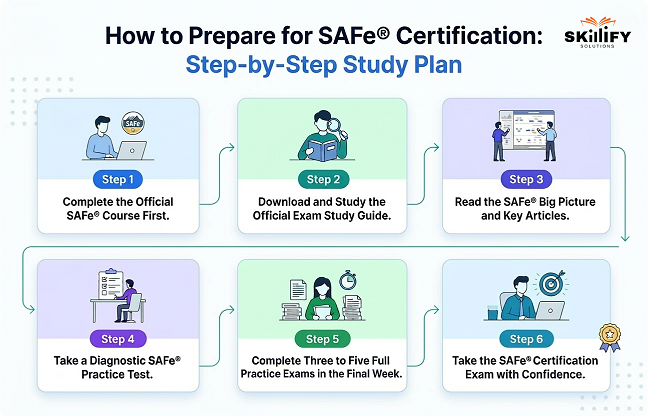
How to Prepare for SAFe® Certification: Step-by-Step Study Plan
Preparing for the SAFe® certification is about understanding how Agile works in real-world scenarios. A structured study plan helps you stay consistent, cover all important topics, and improve your chances of passing on the first attempt.
Experts recommend combining official learning, revision, and practice questions to build a strong concept of clarity and confidence.
Step 1: Complete the Official SAFe® Course First
The first and most important step is to complete an official SAFe® training course. This gives you a clear understanding of the framework, roles, and workflows. Most certifications require training before the exam, and it builds your foundation for everything else.
If you want to explore the right path based on your role, you can go through the Leading SAFe®, SAFe® Scrum Master, or SAFe® POPM courses from Skilllify Solutions. These courses guide you through the exam, pattern, passing marks, and study guide to prepare in a better way.
Step 2: Download and Study the Official Exam Study Guide
After training, go through the official SAFe® exam study guide carefully. It covers all the key topics, concepts, and areas where questions are asked. Treat this as your primary preparation resource.
You can start studying from the important questions before an exam instead of reading the entire textbook.
Step 3: Read the SAFe®Big Picture and Key Articles
The SAFe® Big Picture is one of the most important tools for understanding how everything connects. Reviewing it regularly helps you understand roles, events, and workflows clearly, which is critical for scenario-based questions.
It’s like a company org chart. When you understand who reports to whom and how workflows work, everything becomes clearer.
Step 4: Take a Diagnostic SAFe® Practice Test
Before deep preparation, take a practice test to understand your current level. This helps you identify weak areas and gives you a clear direction on what to focus on next.
For example, taking a mock driving test before your actual license test, you see where you’re making mistakes.
Step 5: Review and Revisit Weak Areas Systematically
Once you know your weak areas, revise those topics thoroughly. Focus more on concepts like PI Planning, ARTs, and SAFe® roles, as these are commonly tested in exams.
Suppose you’re weak in math and you don’t study everything again. You can just try to focus on the chapters you struggle with.
Step 6: Complete Three to Five Full Practice Exams in the Final Week
In the final week, take multiple full-length mock tests. This helps improve your speed, accuracy, and confidence. Regular practice also prepares you for the scenario-based nature of SAFe® exam questions.
For example, doing multiple full rehearsals before a big presentation or match, you perform better because you’ve already practiced.
SAFe® Exam Tips from Experts with 10+ Years Experience
Clearing the SAFe® exam is less about memorizing concepts and more about thinking like an Agile practitioner. Professionals with 10+ years of experience follow a few proven strategies that significantly improve success rates.
1. Focus on “Why.”
Experts do understand why a concept exists. Instead of memorizing PI Planning steps, understand why teams align before execution. This helps you answer scenario-based questions easily.
2. Eliminate Wrong Options First
Most questions have similar-looking answers. The fastest way is to eliminate clearly wrong options first. If two options don’t follow Agile principles, like command-and-control decisions, you can instantly remove them.
3. Think from a SAFe® Mindset
Always choose answers that align with Lean-Agile values like collaboration, decentralization, and continuous improvement. If confused, pick up the option that promotes teamwork over hierarchy.
4. Practice Scenario-Based Questions Daily
Experts spend more time on SAFe® exam practice questions than on theory. Instead of reading Scrum roles, solve questions where you decide what a Scrum Master should do in a situation.
5. Don’t Overthink the Questions
Many candidates fail because they overanalyze simple questions. SAFe® exams usually test straightforward concepts. You can go with the most practical and Agile-aligned answer.
6. Manage Time Smartly During the Exam
Time management is key, especially in longer exams. Don’t spend too much time on one question; mark it and come back later.
7. Revise the SAFe® Big Picture Before the Exam
Experts always review the SAFe®Big Picture just before the test. This helps you quickly recall roles, flows, and processes during the exam. You can go through the SAFe® Big Picture guide to learn the levels, competencies, and layers of SAFe® in a better way.
8. Take Mock Tests in Real Exam Conditions
Simulate the actual exam environment while practicing. Set a timer, avoid distractions, and complete the test in one sitting to build confidence.
SAFe® and Agile Trends in 2026 and 2027
In 2026-2027, Agile is evolving from a team-level approach to a full business strategy. Over 70% of enterprises are expected to adopt Agile at scale, with SAFe® remaining one of the most widely used frameworks. Organizations are now focusing more on business outcomes rather than just processes, with companies reporting up to 30-50% faster delivery cycles after adopting SAFe®.
At the same time, AI integration in Agile is increasing, helping teams improve planning, forecasting, and decision-making.
Another major shift is the rise of DevOps and continuous delivery, with over 80% of Agile teams adopting CI/CD practices to release faster and more frequently.
Companies are also becoming more customer-centric, using real-time feedback to improve products. To stay competitive, it’s important to build practical knowledge and regularly practice SAFe® exam practice questions, as exams are increasingly aligned with real-world trends.
Conclusion
By now, you have a clear path in front of you. Take it step by step, stay consistent, and keep learning with the right mindset. Every hour you invest in preparation moves you closer to success. Small, focused efforts every day will build strong confidence over time.
Remember, it’s about progress. Focus on understanding concepts and reinforcing them with SAFe® exam practice questions. This combination will help you handle real exam scenarios with ease.
Stay calm, trust your preparation, and believe in yourself. When you walk into the exam with clarity and confidence, success becomes a natural outcome, and your certification will follow. Best of luck!
Become an Agile leader with advanced SAFe certifications and structured learning!
Frequently Asked Questions
1. How many questions are on the SAFe® exam?
Most SAFe® exams typically have 45 multiple-choice questions. These questions are scenario-based and test how well you apply concepts rather than just recall them.
2. What is the passing score for the SAFe® Agilist exam?
The passing score is usually around 77%-80%. This means you need about 35 correct answers out of 45. Since questions are scenario-based, strong concept clarity is important to consistently choose the correct answers
3. How long does it take to prepare for a SAFe® certification?
We can here say, once u take the in-class training from us, you should be ready within days or weeks. In general, when you take the class, you have to take the exam within 30 days
4. Are SAFe® practice tests worth it?
Yes, SAFe® practice tests are highly valuable as they help you understand the exam pattern and improve accuracy. They also prepare you for scenario-based questions, making you more confident for the actual exam.
In most Agile teams, things work smoothly until you try to scale. That’s where challenges begin. It can be multiple teams, conflicting priorities, and a lack of alignment. I have seen this happen across organizations, and that’s exactly where SAFe® certification becomes valuable.
SAFe® is designed for enterprise-level Agile, and its certifications are built around real roles. It will help you even if you’re a Scrum Master, Product Manager, or leader. It’s not just theory, but a learning on how large organizations actually deliver work.
In this blog, I’ll walk you through everything you need to know about SAFe® certification in 2026. We will discuss the levels, roles, competencies, and learning path clearly, practically, and without confusion. These will help you decide if it’s the right move for your career or not. Read on to know more!
Suitable for Project, Product, Engineering, and Leadership roles
Strong demand across IT, BFSI, and consulting sectors
Improves career growth and salary potential
What is SAFe® Certification?
SAFe®Certification is a professional credential that proves your understanding of how Agile works at a large, enterprise level.
The Scaled Agile Framework (SAFe®) is designed for organizations that have multiple teams working together and need a structured way to stay aligned. While basic Agile methods like Scrum focus on small teams, SAFe® helps businesses manage dozens or even hundreds of teams working on the same goals.
It was introduced in 2011 by Dean Leffingwell and has evolved to match modern business needs. The latest version focuses on faster delivery, better collaboration, and continuous improvement across the organization.
SAFe®is a complete system that connects people, processes, and business strategy. This is what makes it especially useful for large companies going through digital or Agile transformation.
Core Foundations of SAFe®
Agile practices: Built on Scrum, Kanban, and iterative development
Lean thinking: Focus on delivering value and reducing waste
Systems approach: Looking at the full organization instead of isolated teams
What Makes SAFe®Different?
Designed for large organizations, not just small teams
Aligns multiple teams under one common goal
Connects strategy, execution, and delivery
Uses a clear visual model like the SAFe® framework to define roles and workflows
Helps businesses scale Agile in a structured and practical way
In simple terms, SAFe®Certification shows that you can work in an environment where Agile is applied across the entire organization, not just within a single team. If you’re new to SAFe®, starting with a structured program like the Leading SAFe®Certification can help you understand the framework clearly from the beginning.
Understanding the SAFe®Framework: Certification Levels, Roles, and Learning Paths
SAFe®Certification is not just one course. It is a comprehensive learning system designed for various roles within an organization. Each certification focuses on a specific responsibility and makes it easier for professionals to learn what is relevant to their job.
There are multiple certification levels and paths, depending on whether you are a beginner, team member, manager, or enterprise leader. Most certifications are role-based, meaning you choose based on your current role or the role you want to move into.
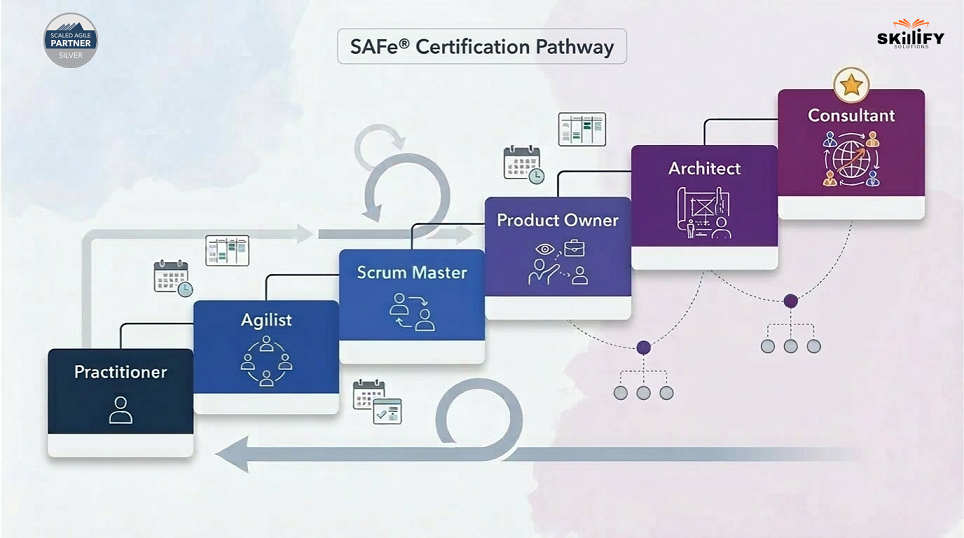
Here are the Common SAFe®Certification Levels
Foundation Level: SAFe®Agilist (SA) will be the best starting point, covering the overall framework.
Team Level: SAFe®Scrum Master (SSM) and SAFe®for Teams (SP). For team roles, courses like SAFe® Scrum Master (SSM) or SAFe® for Teams (SP) from Skillify Solutions are ideal for learning execution and coordination.
Product and Delivery Roles
Product Owner/Product Manager (POPM)
Focus on product planning, backlog, and delivery
Advanced / Leadership Level
Release Train Engineer (RTE)
SAFe® Practice Consultant (SPC)
Note: Overall, SAFe® offers 10+ certifications, covering everything from execution to enterprise strategy.
How the Certification Path Works
Start with a basic understanding, like SAFe® Agilist
Move into role-specific certifications based on your job
Progress to advanced leadership or transformation roles
Certifications are practical + role-focused, not just theory
SAFe® certification paths are designed to help professionals grow from team-level execution to enterprise-level decision-making.
SAFe® 6.0 Overview: What Changed and Why It Matters
SAFe® 6.0 is the latest version of the framework and focuses on making Agile simpler, faster, and more aligned with business goals. It introduces updates based on real-world implementation challenges and modern business needs.
Key Changes in SAFe® 6.0
Stronger focus on Business Agility: Aligns business and IT together
Simplified framework: Fewer roles and clearer structure
Updated role definitions: Scrum Master expanded to Agile Team Coach
Better value delivery: Focus on flow and faster outcomes
Enterprise-wide adoption: Covers all departments, not just tech
In short, SAFe® 6.0 makes it easier for organizations to implement Agile at scale without complexity.
Which SAFe® Certification Should You Pursue First?
Choosing the right SAFe® certification depends on your experience level and career goals. Here’s a simple way to decide:
Beginner: Start with SAFe® Agilist (SA). It gives a complete overview of the framework, and it is considered the most popular entry-level certification
Team: Teams can go for SAFe® Scrum Master (SSM) or SAFe® for Teams (SP). These are best for execution-level roles
Product or Management: You can simply choose POPM (Product Owner/Product Manager) as it focuses on product strategy and delivery
Leading Transformation: Move to RTE or SPC certifications, as it is ideal for leadership and consulting roles
Simple Rule to Follow: Start broad → then specialize → then lead
Once you’ve identified the right certification, enrolling in a structured program makes the journey much easier. You can explore role-based SAFe® courses by Skilliy Solutions based on your career stage.
<H2> SAFe® Certification Costs Explained: Fees, Retakes, and Renewal
SAFe® certifications are offered across multiple roles and levels, and while Scaled Agile does not fix a single global price, most certifications follow a similar pricing structure. The total cost usually includes training + first exam attempt, as certification is tied to authorized learning programs.
Below is a complete breakdown of major SAFe® certifications and their typical costs
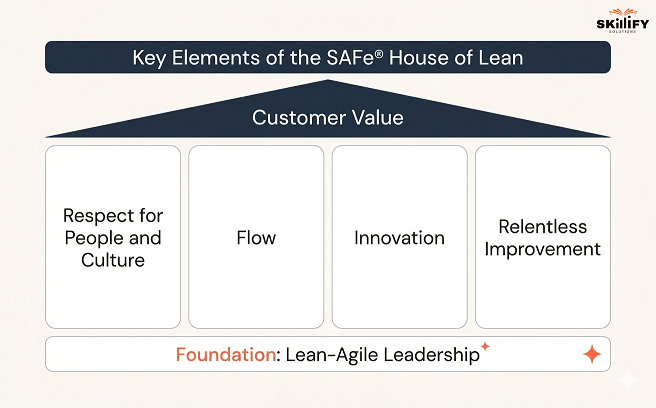
SAFe® is built on a strong foundation of Lean thinking and Agile practices, which help organizations deliver value faster while maintaining quality and alignment.
Instead of focusing only on processes, SAFe® emphasizes mindset and principles that guide how teams work, collaborate, and make decisions. These principles ensure that Agile is scaled effectively across the organization.
Key Lean-Agile Principles in SAFe®
Focus on Customer Value: Every activity should contribute to delivering real business value
Work in Small Batches: Break work into smaller parts for faster delivery and feedback
Continuous Improvement: Teams regularly reflect and improve processes
Decentralized Decision-Making: Empower teams to make faster decisions
Built-in Quality: Maintain quality at every stage, not just at the end
Visualize Workflows: Use boards and systems to track progress clearly
Limit Work in Progress (WIP): Avoid overload and improve efficiency
These principles help organizations reduce delays, improve collaboration, and deliver products faster and more reliably.
PI Planning Basics in SAFe® : How Teams Align and Deliver Value
One of the most important practices in SAFe® is PI Planning (Program Increment Planning). It is a structured event where multiple teams come together to plan, align, and commit to goals for a specific time.
A Program Increment (PI) usually lasts 8–12 weeks, and PI Planning acts as the starting point for execution.
How PI Planning Works
PI Planning is a structured event where all teams come together. It can be physical or virtual, and the main goal is to align on goals and plan upcoming work. During this session, business priorities are clearly defined, and teams break them down into features and tasks.
They also identify dependencies between teams to avoid conflicts and ensure smooth execution. By the end of the session, teams commit to specific outcomes, creating a shared plan for delivery.
Why PI Planning is Important
PI Planning plays a key role in keeping large organizations aligned. It improves transparency by bringing everyone onto the same page, strengthens communication across teams, and helps identify risks early.
This makes delivery more predictable and structured. In simple terms, PI Planning ensures that everyone is working toward the same goal, at the same time, with full clarity.
SAFe® Certification in 2026: Industry Trends and Market Context
In 2026, Agile has become a business strategy for growth and speed. Organizations are now using frameworks like SAFe® to manage complexity, improve decision-making, and deliver value faster.
SAFe® continues to remain highly relevant, especially for enterprises that need structured scaling of Agile across multiple teams and departments. Over 20,000 organizations globally have already adopted SAFe®, and more companies are investing in Agile transformation.
At the same time, the Agile ecosystem is evolving. Companies are not just adopting frameworks, but they are adapting them based on their business needs.
Key Industry Trends in 2026
Shift to Enterprise Agility: Agile is moving beyond teams to become a full business capability, impacting strategy, leadership, and operations.
SAFe® + Scrum Still Dominating Large Enterprises: Scaled frameworks like SAFe® remain critical for managing large, complex organizations.
Rise of AI in Agile: AI is being used for predicting risks, planning sprints, and improving decision-making in Agile environments.
Hybrid Agile Models Growing: Many companies combine Agile with DevOps, Lean, and traditional methods for better flexibility.
Focus on Value Streams Over Projects: Organizations are shifting from project-based work to continuous value delivery models.
Agile Expanding Beyond IT: Functions like HR, marketing, and operations are adopting Agile practices.
What This Means for SAFe® Certification
SAFe® remains a strong choice for enterprise environments as organizations focus on scaling Agile. Certifications are evolving with a focus on AI, leadership, and business agility.
These make them more relevant. There is high demand for professionals who can scale and adapt Agile frameworks, not just follow them.
Career Benefits of SAFe® Certification in 2026
In 2026, companies need professionals who can manage Agile at scale, not just within teams. SAFe® certification helps you build that capability. The rise of Scaled Agile Framework Tools and AI-driven platforms is further improving how organizations implement SAFe® at scale.
Career Benefits
Better opportunities in enterprises and MNCs
Higher salary potential due to specialized skills
Globally recognized certification
Flexibility across roles like Scrum Master, Product, and Agile Coach
Exposure to large, complex projects
Who Should Consider It
Project Managers
Scrum Masters
Product Managers
Engineers moving into leadership roles
Conclusion
We can conclude that SAFe® certification is more than just a credential. Its a way to understand how Agile works at scale in real-world organizations. As companies continue to grow and manage multiple teams, the need for structured frameworks like SAFe® is only increasing.
Whether you are starting your Agile journey or looking to move into leadership roles, SAFe® certification gives you the clarity, skills, and direction to grow. In simple terms, it helps you move from working in Agile to managing Agile at scale.
If you’re serious about building a career in Agile at scale, you can explore all SAFe® certification courses for a better understanding.
Frequently Asked Questions
1. How long does it take to get SAFe® certified?
Most SAFe® certifications require a 2–4 day training course, after which you can take the exam. Many people complete the certification within 1–2 weeks.
2. What is the difference between SAFe® Agilist and SAFe® Practitioner?
SAFe® Agilist (SA) is a foundation-level certification that gives an overview of the framework, mainly for leaders and managers. SAFe® Practitioner (SP) is team-focused, designed for members working on Agile Release Trains and daily execution.
3. Is SAFe® certification worth it in 2026?
Yes, SAFe® certification is valuable in 2026 as companies are focusing on scaling Agile across teams. It improves career opportunities, especially in large organizations
4. How much does a SAFe® certification cost?
The cost typically ranges between $300 to $800, but it can go higher depending on the certification level and training provider.
5. Does SAFe® certification expire, and how do I renew it?
Yes, SAFe® certifications are valid for 1 year. You can renew them by paying an annual renewal fee through the SAFe® platform
Agile works well until you try to scale it. That’s where most organizations struggle. More teams mean more dependencies, misalignment, and slower delivery. I’ve seen teams follow Agile perfectly at a small level, but completely break down when things expand.
That’s exactly the gap SAFe® methodology is designed to solve. It’s not just another framework, but a system that connects strategy, teams, and execution across the entire organization.
But here’s the problem: most people find SAFe® confusing because they focus on terminology instead of understanding its core foundation.
In this blog, I’ll break it down into principles, values, and competencies, so you can finally understand how SAFe® actually works in real-world scenarios.
What is the SAFe® Methodology and Why Does it Matters for Enterprises
The Scaled Agile Framework (SAFe®) is a structured approach that combines workflows, organizational practices, and guiding principles to help large organizations implement Agile effectively. It provides a clear system that defines roles, responsibilities, and ways of working. It ensures that teams can operate in alignment even on a large scale.
SAFe® is designed for organizations that manage complex projects across multiple levels. It includes teams, programs, and portfolios. Instead of isolated Agile efforts, it creates a unified structure where all parts of the business move in the same direction.
The major strength lies in offering a well-defined, yet practical framework. This helps enterprises bring consistency, visibility, and coordination into their operations. This structured approach is one of the key reasons why SAFe® is widely adopted by large organizations.
According to the 12th Annual State of Agile Report, nearly 29% of organizations use SAFe® as their primary approach to scaling Agile. This analytics makes it one of the most widely followed frameworks in enterprise environments.
If you’re new to SAFe®, starting with a structured SAFe® certification course from Skillify Solutions can help you understand these concepts in a practical way.
How SAFe® Differs from Traditional Agile Frameworks
Traditional Agile frameworks like Scrum and Kanban are designed to help small teams work efficiently. They focus on quick iterations, flexibility, and team-level collaboration.
However, when organizations grow and multiple teams start working on the same product, basic Agile often falls short. This is where SAFe® helps. It extends Agile to handle large-scale coordination, planning, and alignment.
Instead of just improving how one team works, SAFe® ensures that all teams in an organization move in the same direction. The table below shows the key differences between SAFe® and Agile frameworks at a glance:
Aspect
Traditional Agile (Scrum/Kanban)
SAFe® (Scaled Agile Framework)
Scope
Single team
Multiple teams + entire organization
Scale
Small projects
Large, complex projects
Structure
Flexible, minimal roles
Defined roles and hierarchy
Team Size
5-10 members
50-150+ members
Planning
Team-level planning
Cross-team, program-level planning
Collaboration
Within one team
Across teams and departments
Alignment
Limited to team goals
Aligned with business strategy
Use Case
Startups, small teams
Enterprises, large organizations
This is also why many professionals choose to pursue SAFe® certification to understand how Agile works at scale. You can go through What is SAFe® Certification to get a better understanding and choose the best for your future.
Understanding the Four Levels of the SAFe® Framework
SAFe® is divided into four levels to manage large-scale work effectively. Each level focuses on a different layer of the organization. It takes care that all of them, from daily tasks to long-term strategy, are connected.
You can think of it as a system where teams execute, programs coordinate, and leadership guides direction. Here are the four levels of the SAFe® Framework:
Team Level: This is where the actual work happens. Agile teams use Scrum or Kanban to deliver features in small iterations. The focus is on execution and delivery at this level of the SAFe® framework.
Program Level: Here, multiple teams come together and align their work. They follow a shared plan and deliver value in fixed cycles. These are called Program Increments, and the key focus comes with coordination across teams
Large Solution Level: This level is mostly usedwhen projects are very complex and involve multiple programs. It helps manage large systems that require high-level coordination. Here is the key focus: handling complex and multi-program solutions.
Portfolio Level: This is the top level where business decisions are made. It ensures that all work aligns with the company’s strategy and investment priorities. The core focus includes strategy, funding, and governance
Together, these levels create a connected system in which strategy flows down, and execution flows up, ensuring clarity, alignment, and better results across the organization. To understand how these levels work in real-world scenarios, many professionals start with the Leading SAFe® Certification, which covers the full framework end-to-end.
Lean-Agile Principles That Power SAFe®
SAFe® is built on a set of Lean-Agile principles that guide how teams plan, work, and deliver value at scale. These principles focus on efficiency, alignment, and decision-making across the organization. Instead of just following processes, SAFe® encourages a mindset of continuous improvement and value delivery.
Let’s look at the key Principles
Focus on Value: Delivering maximum business value with minimum waste
Think in Systems: Helps to optimize the entire workflow, not just individual teams
Work in Small Batches: This is to deliver faster and get quick feedback
Stay Flexible: Keeping options open and adapting them as needed
Continuous Learning: Improve through regular feedback and iteration
Limit Work in Progress: Avoiding overload and improving efficiency
Empower Teams: This principle helps to enable faster decision-making at the team level
Organize Around Value: Structuring the work based on outcomes.
SAFe® builds on the core values of the Agile Manifesto. These are collaboration, working solutions, customer focus, and adaptability, and extend them beyond individual teams. While Agile was originally designed for small teams, SAFe® applies the same thinking across multiple teams and business units.
In simple terms, SAFe® keeps the flexibility and speed of Agile, but adds the structure needed for large organizations to stay aligned. This ensures that teams can adapt to change while still delivering consistent value at a scale.
SAFe® Core Values: The Foundation of Alignment and Execution
SAFe® is built on a set of core values that guide how teams collaborate, make decisions, and deliver work at scale. These values ensure that even in large organizations, everyone stays aligned, transparent, and focused on outcomes.
According to the official SAFe® framework, the core values include alignment, transparency, respect for people, and continuous improvement, which act as the foundation for successful implementation.
Below are the key SAFe® Core Values
Alignment: Ensures all teams work toward a common business goal
Transparency: Builds trust through open communication and visibility
Respect for People: Empowers teams and encourages collaboration
Relentless Improvement: Focus on continuous learning and growth
In simple terms, these values create a system where teams are connected, trusted, and constantly improving, leading to better execution at scale. To understand how to get certified and choose the right path, you can read our complete guide on SAFe®Certification for 2026.
While values define the mindset, SAFe® core competencies define what organizations need to do well to achieve true business agility. These competencies act as key capability areas that help enterprises scale Agile successfully.
SAFe® uses these competencies to measure and improve how effectively an organization delivers value, adapts to change, and aligns teams with strategy. Below are the key SAFe® Core Competencies.
Lean-Agile Leadership: Leaders drive culture and transformation
Team and Technical Agility: Teams deliver high-quality work consistently
Agile Product Delivery: Focus on customer value and fast delivery
Enterprise Solution Delivery: Manage large and complex systems
Lean Portfolio Management: Align strategy with execution and funding
Continuous Learning Culture: Encourage innovation and improvement
Organizational Agility: Enable the entire business to respond to change
Key Competencies That Drive Large-Scale Organizations
In large organizations, not all competencies carry equal weight. Some are more critical because they directly impact alignment, delivery speed, and business outcomes. These key competencies help enterprises manage complexity while staying agile.
Most Important Competencies
Lean-Agile Leadership: Strong leadership is essential to drive transformation and decision-making
Team and Technical Agility: Ensures teams can consistently deliver high-quality work
Agile Product Delivery: Keeps focus on customer value and faster releases
Lean Portfolio Management: Aligns business strategy with execution and funding
The SAFe® House of Lean: Building a Culture of Continuous Improvement
The SAFe® House of Lean is a visual model that explains how organizations can build a system focused on continuous improvement and value delivery. It shows that success doesn’t come from tools alone, but from a strong foundation of leadership, culture, and working principles.
The house here represents how different elements come together. At the top is the goal, delivering value to customers quickly and consistently.
This is supported by key pillars like respect for people, smooth workflow, innovation, and continuous improvement. At the base is Lean-Agile leadership, which ensures that the right mindset and direction are in place.
Key Elements of the SAFe® House of Lean
Foundation: Lean-Agile Leadership
Leaders play a critical role in setting the vision and building the right environment for Agile to succeed. They encourage open communication, learning, and innovation, while also supporting teams during change. Strong leadership ensures that Agile is not just implemented but sustained and continuously improved over time.
Pillar 1: Respect for People and Culture
This pillar focuses on creating a workplace where people feel valued, trusted, and empowered. When teams are respected, they take ownership of their work, collaborate better, and contribute more effectively. A strong culture of respect leads to higher motivation, better teamwork, and improved outcomes.
Pillar 2: Flow
Flow is about ensuring that work moves smoothly from start to finish without unnecessary delays. By reducing bottlenecks and managing workload properly, organizations can deliver faster and more predictably. Good flow also helps teams focus on completing tasks instead of constantly switching between them.
Pillar 3: Innovation
Innovation encourages teams to think beyond routine work and explore new ideas, better solutions, and improved ways of working. Organizations that support experimentation and learning can adapt quickly to changes and stay competitive in the market.
Pillar 4: Relentless Improvement
Continuous improvement is a key part of SAFe®. Teams regularly reflect on their work through feedback sessions and retrospectives, identifying what can be improved. Small, consistent improvements over time lead to better efficiency, quality, and performance.
SAFe® Adoption in 2026: Enterprise Use Cases and Trends
In 2026, enterprises are adopting SAFe® to manage large-scale operations with better alignment and faster delivery. It is widely used across industries like IT, BFSI, telecom, and manufacturing, where multiple teams need to work together on complex projects. Organizations use SAFe® to connect business goals with execution, reduce delays, and improve coordination across departments.
At the same time, SAFe® adoption is evolving beyond IT. Companies are applying it across functions like operations, strategy, and product management, focusing more on continuous value delivery instead of one-time projects.
In simple terms, SAFe® is helping enterprises become more agile, aligned, and efficient at scale. This growing adoption is also increasing demand for professionals with SAFe® for Teams (6.0) Certification and hands-on understanding of the framework.
Conclusion
SAFe® methodology helps organizations move from isolated Agile teams to a fully aligned, enterprise-wide system. By combining principles, values, and competencies, it creates a structure where teams can deliver faster while staying connected to business goals.
For professionals, understanding SAFe® is not just about learning a framework; it’s about understanding how large organizations actually operate and scale Agile effectively.
It can be concluded from the above blog that SAFe® helps you move from doing Agile in teams to driving Agile across the organization. If you’re looking to apply these concepts in real-world scenarios, you can explore SAFe® certification courses here by Skillify Solutions.
Frequently Asked Questions
1. What is SAFe® in Agile?
SAFe® (Scaled Agile Framework) is a framework that helps organizations apply Agile practices across multiple teams and at an enterprise level. It combines Agile, Lean, and DevOps to improve coordination and delivery.
2. How is SAFe® different from Scrum?
Scrum focuses on single teams and small projects, while SAFe® is designed for multiple teams and large organizations. SAFe® adds structure, roles, and planning across teams to ensure alignment.
3. Is SAFe® suitable for large enterprises?
Yes, SAFe® is specifically designed for large enterprises. It helps manage complex projects, align teams with business goals, and scale Agile across the organization.
A few years ago, companies relied mostly on instinct and experience to make business decisions.Today, the smartest companies rely on data.
But having data alone isn’t enough. The real challenge is knowing how to analyze it, interpret it, and turn it into decisions that move the business forward.
That’s where Top Data Analytics Companies play a critical role. They help businesses turn messy spreadsheets, customer behaviour data, and operational numbers into insights that actually guide decisions. These firms combine technology, AI, and analytics expertise to help organisations uncover patterns, predict trends, and make smarter strategic decisions.
In this blog, we take a closer look at the top data analytics companies to watch in 2026 and how these organizations are helping businesses unlock the true value hidden inside their data.
Top Data Analytics Companies Transforming Business Intelligence in 2026
Data analytics has become a critical capability for organizations looking to improve decision-making, optimize operations, and uncover new business opportunities. Leading analytics companies combine data engineering, artificial intelligence, machine learning, and business intelligence tools to help businesses turn raw data into actionable insights.
The companies listed below are widely recognized for delivering enterprise analytics solutions, data platforms, consulting services, and AI-driven insights across industries such as finance, healthcare, retail, and technology.
Selection Criteria
The companies in this list were selected based on the following factors:
Global reputation in data analytics and business intelligence services
Strong enterprise client base and consulting capabilities
Advanced analytics technologies, including AI, machine learning, and cloud data platforms
Industry recognition from reports, analyst rankings, and enterprise adoption
Learn Data Analytics and unlock high-demand career opportunities today.
Leading Enterprise Data Analytics Companies in 2026 (Global Rankings #1–5)
1. Accenture
Accenture is a global professional services company. It provides a wide range of data analytics, artificial intelligence, and digital transformation services to organizations across industries.
The company helps businesses modernize their data infrastructure, build data-driven strategies, and generate insights. All these help to improve decision-making and operational efficiency. Students from the certified Data Analyst Bootcamp get placed here due to a strong foundation and advanced techniques.
Work: Offers AI, cloud, and data analytics solutions with a strong focus on data strategy, advanced analytics, and AI-driven automation.
Scope: Helps enterprises transform raw data into actionable insights that drive innovation, efficiency, and business growth.
Size: 700,000+ employees globally
2. Deloitte
Deloitte is one of the largest global consulting firms offering data analytics, business intelligence, and AI-powered advisory services. The company works with enterprises to build analytics capabilities that support strategic decision-making and digital transformation initiatives.
Work: Provides data analytics consulting, AI implementation, and business intelligence solutions.
Scope: Helps organizations leverage data for strategic planning, operational improvement, and risk management.
Size: 450,000+ employees globally
3. IBM
IBM is a technology leader known for its enterprise data analytics platforms and AI-powered solutions. Through technologies such as IBM Watson and hybrid cloud analytics platforms, the company helps organizations analyze large datasets and build predictive models.
Work: Develops AI-driven analytics platforms, data management systems, and enterprise AI solutions.
Scope: Supports businesses in building predictive analytics capabilities and data-driven decision systems.
Size: 280,000+ employees globally
4. Capgemini
Capgemini is a global consulting and technology services company specializing in data engineering, cloud analytics, and AI-driven business transformation. The company helps organizations modernize their data architecture and implement scalable analytics solutions.
Work: Provides data engineering, big data analytics, and cloud-based analytics services.
Scope: Enables organizations to adopt modern data platforms and advanced analytics strategies.
Size: 350,000+ employees globally
5. PwC
PwC (PricewaterhouseCoopers) is a global professional services network offering data analytics consulting and business intelligence solutions. The firm focuses on helping organizations use data to improve risk management, compliance, and strategic decision-making.
Work: Delivers analytics consulting, data strategy development, and business intelligence solutions.
Scope: Helps enterprises transform data into insights that support financial planning and operational efficiency.
Size: 360,000+ employees globally
Top Specialized Data Analytics Platforms and Technology Leaders in 2026 (Global Rankings #6–10)
6. Teradata
Teradata is a leading provider of enterprise data warehousing and analytics platforms. Its solutions help organizations store, process, and analyze massive volumes of structured and unstructured data for business insights.
Work: Provides cloud-based data warehousing, advanced analytics platforms, and big data processing tools.
Scope: Enables organisations to analyze large-scale datasets and improve data-driven decision-making.
Size: ~8,000 employees globally
7. SAS
SAS is a well-established analytics software company specializing in advanced analytics, statistical modeling, and predictive analytics solutions. Its tools are widely used in industries that rely on complex data analysis.
Work: Offers analytics software for predictive modeling, risk analysis, and data visualization.
Alteryx provides a powerful self-service analytics platform that allows users to prepare, blend, and analyze data without extensive coding knowledge. It is widely used by organisations looking to automate data workflows and accelerate analytics processes.
Work: Develops analytics automation platforms for data preparation and advanced analytics.
Scope: Helps analysts quickly transform raw data into insights using automated workflows.
Size: ~2,500 employees globally
9. MicroStrategy
MicroStrategy is a business intelligence company known for its enterprise analytics and data visualization platforms. Its software enables organizations to build interactive dashboards and deliver real-time insights across the enterprise.
Work: Provides BI tools, analytics dashboards, and enterprise reporting platforms.
Scope: Enables organizations to monitor business performance through advanced data visualization.
Size: ~2,000 employees globally
10. Databricks
Databricks is a fast-growing data and AI company that offers a unified platform for data engineering, analytics, and machine learning. Its Lakehouse architecture combines the benefits of data lakes and data warehouses, enabling organizations to process massive datasets efficiently.
Work: Provides unified data and AI platforms for analytics, machine learning, and big data processing.
Scope: Helps enterprises build scalable analytics infrastructure and AI-driven applications.
Size: ~6,000+ employees globally.
Key Services Offered by Leading Data Analytics Companies
Top data analytics companies offer a range of services that help organisations collect, process, analyse, and use data to make better business decisions. These services combine data engineering, analytics tools, and AI technologies to transform raw data into actionable insights.
Data Strategy and Consulting: Data analytics firms help businesses create a clear data strategy and governance framework. This includes identifying data sources, building data architecture, and defining how data can support business goals.
Business Intelligence and Visualization: Business intelligence services focus on turning complex datasets into interactive dashboards and reports. Tools like Power BI, Tableau, and MicroStrategy help organizations track performance and make faster decisions. Students can learn Business Intelligence from a certified Business Analyst Course within a very short timeline.
Advanced Analytics and AI: Advanced analytics services use machine learning, predictive analytics, and AI models to uncover patterns in data. These insights help businesses forecast trends, automate decisions, and improve operational efficiency.
Big Data Engineering: Big data engineering focuses on building systems that can store, process, and analyze massive datasets. Technologies such as Hadoop, Spark, and modern data platforms allow companies to handle large-scale data processing.
Cloud Analytics Solutions: Cloud analytics platforms help businesses store and analyze data using cloud infrastructure like AWS, Azure, and Google Cloud. These solutions provide scalability, faster data processing, and reduced infrastructure costs.
Industry-Specific Solutions: Many analytics companies develop industry-focused solutions for sectors like finance, healthcare, retail, and manufacturing. These solutions use domain-specific data models and analytics frameworks to solve industry challenges.
How to Choose the Right Data Analytics Company for Your Business
Before selecting a partner, businesses should evaluate several important factors to ensure the company can deliver reliable and scalable analytics solutions.
Industry expertise: A good analytics partner should have experience in your specific industry. Companies that understand industry challenges and data patterns can provide more relevant insights and practical solutions.
Technology compatibility: The analytics company should work with technologies that match your current systems. Compatibility with tools such as cloud platforms, data warehouses, and business intelligence software ensures smoother integration and faster implementation.
Pricing transparency: Clear and transparent pricing is essential. Businesses should look for partners that provide detailed cost structures, helping avoid hidden charges and allowing better budget planning.
Scalability factor: As data grows, analytics systems must scale accordingly. A reliable partner should provide solutions that can handle increasing data volumes and support future business expansion.
Security and compliance: Since analytics involve sensitive data, strong security practices are critical. The partner should follow industry standards for data protection and regulatory compliance.
Proven track record: Companies with successful projects, strong client portfolios, and positive industry recognition are more likely to deliver reliable analytics solutions and measurable business results.
Learn Python, SQL, and analytics skills employers are actively seeking from our Data Analytics Bootcamp today!
ROI and Business Impact of Data Analytics Solutions
Data analytics help businesses improve decision-making, increase revenue, and reduce operational costs. The ROI of data analytics measures how much value a company gains from analytics compared to the cost of implementing analytics tools, infrastructure, and teams. Calculating ROI and operational efficiency will help you understand the Data Analyst Job Outlook in the future to make better decisions.
Basic ROI Formula
ROI (%) = (Net Benefit from Analytics − Analytics Investment Cost) ÷ Analytics Investment Cost × 100
Here is an example:
Analytics investment: $100,000Business value generated: $250,000 ROI = ($250,000 − $100,000) ÷ $100,000 × 100 = 150% ROI
Stepping into a project management interview can feel like a big moment in your project management career. Hiring managers want to see more than just a list of skills on your resume; they want to understand how you think, solve problems, and lead a team. That’s why preparing for common project management interview questions is so important. By thinking through your answers to these project management interview questions beforehand, you can walk into your interview with confidence, ready to show why you’re the best person for the job.
If you are just starting out, interviewers will focus on your foundational knowledge and core abilities. These project management basics interview questions are designed to check if you understand the fundamental concepts and possess the raw talent to grow into a successful project manager.
Your answers should demonstrate a solid grasp of theory, good communication skills, and an eagerness to learn. Even without extensive experience, you can impress by connecting the job description to your potential. Let’s explore some of these entry-level questions.
1. What is project management, and why does it matter?
Project management is the discipline of planning, executing, and overseeing projects to achieve specific goals within a defined timeframe and budget. It organizes resources, manages tasks, and leads teams to deliver successful outcomes. Effective project management is essential because it brings structure and predictability, helping teams collaborate efficiently and ensuring projects stay on track. Without it, projects risk missing deadlines, exceeding budgets, or failing to meet objectives. Ultimately, project management matters because it:
Ensures projects are completed on time and within budget.
Helps teams navigate risks and challenges smoothly.
Aligns project outcomes with overall business objectives.
2. What are the main responsibilities of a project manager?
A project manager is like the captain of a ship, responsible for guiding the project from start to finish. Their main duty is to ensure the project meets its goals by managing all its moving parts. This involves a blend of planning, organizing, leading, and controlling.
The role extends beyond just tracking tasks. A project manager must motivate team members, communicate with stakeholders, and manage risks. They use various project management tools to keep everything on track and ensure transparency. Their ability to balance deadlines, budget, and scope is critical to success.
Key responsibilities typically include:
Defining the project scope, goals, and deliverables.
Developing a detailed project plan and schedule.
Leading and supporting the project team members throughout the process.
3. What are the key phases of the project management lifecycle?
The project management lifecycle is a structured approach to managing projects from start to finish. It consists of five key phases, each with specific objectives and tasks. These phases help ensure the project stays organized, on track, and meets its goals. Understanding this lifecycle is essential for effective project management.
Here is a simple breakdown of the five phases:
Phase
Description
1. Initiation
The project is defined at a high level, and its feasibility is determined. This is where the project charter is created.
2. Planning
A detailed project plan is developed, outlining the scope, budget, timeline, resources, and tasks.
3. Execution
The project team carries out the tasks defined in the plan to produce the deliverables.
4. Monitoring & Controlling
Project progress is tracked against the plan. The project manager makes adjustments as needed to stay on course.
5. Closure
The project is formally closed, deliverables are handed over, and the team documents lessons learned for future projects.
4. What is a project charter and what should it include?
A project charter is a formal document that officially authorizes a project to begin. It serves as the project’s foundation, providing a high-level overview of its objectives, scope, and stakeholders. Think of it as the project’s birth certificate; it gives the project manager the authority to apply organizational resources to project activities.
This document is created during the initiation phase and is crucial for aligning everyone’s expectations from the very start. It ensures that key stakeholders and the project team are on the same page before the detailed project plan is developed. A clear and concise project charter prevents confusion and sets the stage for a successful project.
A well-written project charter should include:
The project’s vision, objectives, and scope.
Key stakeholders and their roles.
High-level risks, budget, and timeline.
5. What is the difference between a project, program, and portfolio?
Understanding the distinction between a project, program, and portfolio is key technical knowledge for any project manager. While they are related, they represent different levels of strategic planning and management within an organization. A project is a temporary endeavor designed to create a unique product, service, or result.
A program is a group of related projects managed in a coordinated way to obtain benefits not available from managing them individually. For example, building a new software application could be a project, while a program might involve developing the software, training users, and marketing it. This coordination provides a higher level of oversight.
A portfolio is the highest level, representing a collection of projects, programs, and other work that are grouped together to meet strategic business objectives.
Project: A single, temporary effort (e.g., developing a new website).
Program: A collection of related projects (e.g., a digital transformation initiative).
Portfolio: All projects and programs aligned with a company’s strategic goals.
6. What is scope management in project management?
Scope management involves defining and controlling what is and isn’t included in a project. It sets clear boundaries and ensures the team focuses only on approved tasks, preventing unnecessary features or work. A detailed scope statement is prepared as part of the project plan, outlining deliverables, objectives, and limits. This statement helps all stakeholders understand exactly what the project will accomplish.
Throughout the project, the project manager monitors the scope and manages any changes through a formal change control process. Proper scope management protects the project from “scope creep,” helping keep it on schedule and within budget, and ensuring successful delivery.
7. Which skills are essential for a successful project manager?
A successful project manager needs a balanced mix of technical and soft skills. While knowing project management methodologies is important, people skills often make the biggest difference. Strong leadership skills are at the top of the list, as a project manager must guide and motivate team members to achieve a common goal.
Excellent communication skills are equally vital. A project manager is the central point of contact and must be able to clearly convey information, listen to concerns, and negotiate with stakeholders. They need to keep everyone informed and aligned, from the project team to senior executives. This helps prevent misunderstandings and keeps the project moving forward smoothly.
Other essential skills include:
Problem-solving: The ability to identify issues and find practical solutions.
Time management: Skillfully prioritizing tasks and managing deadlines.
Risk management: Proactively identifying and mitigating potential project risks.
8. What tools do project managers commonly use?
Project managers rely on a variety of project management tools to plan, execute, and monitor their projects effectively. These tools range from simple spreadsheets and charts to sophisticated project management software. The choice of tool often depends on the project’s complexity, the team’s size, and the organization’s preferences.
Modern project managers frequently use collaboration software to keep their teams organized and connected. These platforms help with task assignment, progress tracking, and communication, which is especially useful for remote or distributed teams. Familiarity with these tools is often a key requirement in job descriptions.
Some common examples of project management tools include:
Collaboration Software: Asana, Trello, and Jira for task management and team collaboration.
Charting Tools: Gantt charts for scheduling and RACI charts for defining roles and responsibilities.
Communication Platforms: Slack and Microsoft Teams for real-time team communication.
9. What is stakeholder management?
Stakeholder management is the process of identifying, analyzing, and engaging with anyone who has an interest in or is affected by your project. Stakeholders can include clients, team members, executives, suppliers, and even the public. Effectively managing their expectations and involvement is crucial for a project’s success.
The first step is to identify all potential stakeholders and understand their needs, influence, and expectations. Once they are identified, a project manager must develop a communication plan to keep them informed and engaged. This requires excellent communication skills and the ability to tailor messages to different audiences. Keeping stakeholders happy and supportive helps prevent roadblocks and ensures a smoother project journey.
A key part of stakeholder management is balancing competing interests. Different stakeholders may have conflicting priorities, and the project manager must navigate these challenges through negotiation and clear communication. The goal is to build strong relationships and ensure that the project delivers value to all key parties involved.
10. What is risk management in project management?
Risk management is the proactive process of identifying, assessing, and responding to potential risks that could impact a project. A risk is any uncertain event that, if it occurs, could have a positive or negative effect on the project goals. A skilled project manager doesn’t just react to problems; they anticipate them.
The process starts with identifying potential risks during the planning phase. The team brainstorms everything that could go wrong, from technical issues and budget cuts to team member absences. Once risks are identified, they are analyzed to determine their likelihood and potential impact. This helps prioritize which risks need the most attention.
Finally, the project manager develops response plans for the most significant risks. These plans outline the specific actions to be taken if a risk occurs. The key steps in risk management include:
Risk Identification: Listing all potential threats and opportunities.
Risk Analysis: Evaluating the probability and impact of each risk.
Risk Response Planning: Creating strategies to mitigate threats and exploit opportunities.
Intermediate Project Manager Interview Questions and Answers
Once you move beyond entry-level roles, a job interview will dig deeper into your practical project management experience. Interviewers want to hear specific examples of how you’ve handled common project challenges. They’ll ask questions that test your problem-solving abilities, leadership style, and familiarity with different project management tools and techniques.
These intermediate questions are designed to see if you can apply theoretical knowledge to real-world situations. Be prepared to talk about your past projects, the decisions you made, and the outcomes you achieved. The following questions cover scenarios you’re likely to have faced.
11. How do you prioritize tasks in a project?
Prioritizing tasks is a critical time management skill for any project manager. To do this effectively, I rely on a combination of methods to determine what needs immediate attention from team members. My approach is always tied to the project’s overall goals and deadlines.
First, I often use a priority matrix, like the Eisenhower Matrix, to categorize tasks based on their urgency and importance. This helps distinguish between what must be done now, what can be scheduled for later, and what can be delegated or eliminated. I also consider task dependencies—some tasks must be completed before others can begin, making them a natural priority.
Finally, I always consult with stakeholders to understand their priorities. Their input is crucial for ensuring that the team is working on what delivers the most value. Key methods I use include:
MoSCoW Method: Categorizing tasks as Must-haves, Should-haves, Could-haves, and Won’t-haves.
Critical Path Analysis: Identifying the sequence of tasks that directly impacts the project’s completion date.
Stakeholder Input: Regularly checking in with key stakeholders to align priorities.
12. How do you manage remote or cross-functional project teams?
Managing remote teams or cross-functional groups requires a deliberate focus on communication and collaboration. As a project manager, my first step is to establish clear communication channels and expectations. This means setting up regular virtual meetings, using a central platform for updates, and defining response times.
To foster a sense of unity among remote team members, I make sure to create opportunities for connection beyond just work tasks. Virtual coffee breaks or team-building activities can help build relationships and trust. For cross-functional teams, it’s important to ensure everyone understands each other’s roles and perspectives. I facilitate workshops to align the team on project goals.
Success with these teams comes down to a few key practices:
Setting clear expectations: Defining communication protocols and goals from the start.
Using the right tools: Employing collaboration software to keep everyone connected and on the same page.
Promoting open dialogue: Encouraging team members to share updates, ask questions, and raise concerns openly.
13. How do you handle scope creep mid-project?
Handling scope creep is a test of a project manager’s control and communication skills. When a new request arises mid-project, my first step is not to say no, but to assess its impact. I analyze how the change would affect the project’s timeline, budget, and resources.
I then present this analysis to the stakeholders who requested the change. This creates a transparent conversation about the trade-offs. If the change is deemed essential, I initiate a formal change control process. This ensures the change is properly documented, approved, and integrated into the project plan. This prevents uncontrolled additions from derailing the project.
My strategy for managing scope creep involves these steps:
Acknowledge and Assess: Listen to the request and evaluate its impact on the project constraints.
Communicate Transparently: Discuss the implications (cost, time, resources) with stakeholders.
Follow a Formal Process: Use a change control system to approve and document any scope changes.
14. How do you track project progress and performance?
Tracking project progress and performance is essential for keeping a project on course. I use a combination of quantitative and qualitative methods to get a full picture. Key Performance Indicators (KPIs) are my starting point. These metrics, such as budget variance and schedule variance, provide objective data on how the project is performing against the original plan.
I rely on project management software to visualize this data through dashboards and reports. Tools like Gantt charts help me track task completion against the timeline, while Kanban boards offer a real-time view of workflow and potential bottlenecks. These tools make it easy to share progress updates with stakeholders and the team.
Beyond the numbers, I also hold regular check-in meetings with the team. These meetings are crucial for understanding team dynamics, uncovering hidden challenges, and gathering qualitative feedback on progress. This combination of hard data and human insight allows me to steer the project effectively and make informed decisions.
15. How do you estimate project timelines?
Estimating project timelines accurately is a mix of art and science, and it’s one of the most important project management skills. I use several techniques to create realistic estimates. I never rely on a single method, as combining approaches provides a more reliable forecast.
For projects similar to past work, I use analogous estimating, which bases the new timeline on data from previous, similar projects. For more unique projects, I use bottom-up estimating, where the team breaks down the project into small tasks and estimates the time for each one. We then add these estimates together to get a total project duration.
No estimate is perfect, so I always include a buffer for unexpected delays. My preferred estimation techniques include:
Analogous Estimating: Using historical data from similar projects.
Parametric Estimating: Using statistical relationships between historical data and other variables.
Three-Point Estimating: Calculating an average based on optimistic, pessimistic, and most likely scenarios.
16. How do you handle conflicts within a project team?
Conflict within a project team is inevitable, but how it’s handled can make or break team dynamics. My approach to conflict resolution is to address it directly and constructively before it escalates. I start by speaking with the involved parties individually to understand their perspectives without judgment.
Once I have a clear picture, I bring them together for a mediated conversation. The goal is to find common ground and a mutually agreeable solution. I act as a neutral facilitator, ensuring the discussion remains respectful and focused on the problem, not on personalities. This requires strong communication skills and emotional intelligence.
My conflict resolution process generally follows these steps:
Listen: Understand each person’s point of view separately.
Facilitate: Bring the parties together to discuss the issue openly and calmly.
Find a Solution: Guide the team toward a compromise that aligns with the project’s goals.
17. How do you ensure project deliverables meet quality standards?
Ensuring project deliverables meet quality standards is a continuous process, not a final check. My approach is to build quality into the project from the very beginning. This starts with clearly defining quality standards and acceptance criteria with the stakeholders during the planning phase.
Throughout the project, I implement quality assurance processes, such as peer reviews and testing, at key milestones. This helps catch issues early before they become bigger problems. My leadership skills are important here, as I need to foster a culture where every team member feels responsible for quality.
To ensure high-quality outcomes, I focus on:
Defining Quality Metrics: Setting clear, measurable standards for success at the start.
Regular Reviews: Conducting testing and reviews throughout the project lifecycle.
Continuous Feedback: Creating a feedback loop with stakeholders to ensure the final product meets their expectations.
18. How do you manage a project budget effectively?
Effective budget management is about more than just tracking expenses; it’s about making smart financial decisions throughout the project. I start by creating a detailed project budget during the planning phase, breaking down costs by task and resource. This detailed estimate serves as our financial baseline.
As the project progresses, I use project management tools to monitor actual spending against the budget in real-time. This allows me to spot any variances early. If costs start to exceed the plan, I investigate the root cause and take corrective action, which might involve reallocating funds or finding more cost-effective solutions.
My strategy for managing a project budget includes:
Detailed Estimation: Creating a thorough cost breakdown at the beginning.
Continuous Tracking: Using software to monitor spending against the budget.
Proactive Control: Identifying and addressing budget variances before they become major issues.
Agile and Scrum Project Management Interview Questions
In today’s fast-paced environment, many companies have adopted Agile project management methodologies. As a result, you can expect scrum interview questions to be a significant part of your project manager interview. These questions test your understanding of iterative development, collaboration, and flexibility.
Whether you’re a certified Scrum Master or have simply worked in an Agile environment, showing you understand the principles and practices is key. Hiring managers want to see if you can lead a team in a dynamic setting where change is expected. Let’s review some common Agile and Scrum questions.
19. What is Agile project management and when should you use it?
Agile project management is an iterative approach that focuses on delivering value to customers in small, incremental steps. Unlike traditional methods where all planning is done upfront, Agile embraces flexibility and collaboration. Teams work in short cycles called sprints, allowing them to adapt to changes and get feedback quickly.
This methodology is best suited for projects where the requirements are expected to change or are not fully understood at the start. It thrives in dynamic environments like software development, where customer needs can evolve. The emphasis is on continuous improvement and responding to change rather than strictly following a plan.
You should consider using Agile when:
The project requirements are uncertain or likely to change.
You need to deliver a working product to the market quickly.
Close collaboration with the customer is possible and desired.
20. What is Scrum and how does it work?
Scrum is a popular framework for implementing Agile project management. It provides a structured yet flexible way for teams to deliver products of the highest possible value. The work is done in short, time-boxed iterations called sprints, which typically last from one to four weeks.
At the beginning of each sprint, the team selects a small number of items from a prioritized list called the product backlog. The team then works to complete these items during the sprint. Daily stand-up meetings, known as Daily Scrums, help keep team members aligned and address any roadblocks.
At the end of the sprint, the team presents the completed work to stakeholders and reflects on their process in a retrospective meeting. The key elements of Scrum are:
Sprints: Short, consistent cycles of work.
Product Backlog: A prioritized list of all desired features and work.
Scrum Team: A self-organizing group of team members including a Product Owner, Scrum Master, and Developers.
21. What are the key Scrum ceremonies and their purpose?
Scrum ceremonies are a series of recurring meetings that provide the structure for the Scrum framework. Each ceremony has a specific purpose designed to promote transparency, inspection, and adaptation. These are not just meetings for the sake of meetings; they are essential for keeping the agile project management process on track.
These events create a regular cadence for the team to plan their work, collaborate, review progress, and improve their process. A project manager’s skill in facilitating these ceremonies is crucial for a successful Scrum implementation. They ensure that every meeting is productive and helps move the project forward.
The key Scrum ceremonies are:
Sprint Planning: The team decides what work will be completed in the upcoming sprint.
Daily Scrum: A short, daily meeting for the team to sync up on progress and obstacles.
Sprint Review: The team demonstrates the work completed during the sprint to stakeholders.
Sprint Retrospective: The team reflects on the past sprint and identifies ways to improve in the next one.
22. What is a sprint and how do you plan one?
In Scrum, a sprint is a short, time-boxed period during which a specific amount of work is completed and made ready for review. Sprints are the heartbeat of Scrum, and they are typically one to four weeks long. The goal of each sprint is to create a valuable and potentially shippable product increment.
Planning a sprint is a collaborative event called Sprint Planning. During this meeting, the entire Scrum team works together. The Product Owner presents the highest-priority items from the product backlog. The development team then decides how much of that work they can realistically commit to completing during the upcoming sprint.
The team creates a sprint backlog, which is a list of the selected items and a plan for how to deliver them. The key steps for planning a sprint are:
Define the Sprint Goal: Determine the primary objective for the sprint.
Select Backlog Items: The team pulls items from the product backlog into the sprint backlog.
Create a Plan: The team breaks down the selected items into smaller tasks.
23. What is the difference between Agile and Waterfall?
Agile and Waterfall are two fundamentally different project management methodologies. The Waterfall model is a traditional, sequential approach where the project is broken down into distinct phases. Each phase must be fully completed before the next one begins, much like a waterfall flowing over a series of steps.
In contrast, an agile project management approach is iterative and flexible. Instead of one big delivery at the end, Agile delivers work in small, usable increments. It welcomes change and involves continuous collaboration with the customer throughout the project. This allows for greater adaptability in projects with evolving requirements.
Here are the main differences:
Flexibility: Agile is highly flexible, while Waterfall is rigid.
Customer Involvement: Agile involves continuous customer feedback, whereas Waterfall has limited involvement after the initial requirements phase.
Delivery: Agile delivers value incrementally, while Waterfall has a single final delivery.
24. How do Agile teams handle changing requirements?
Handling changing requirements is a core strength of agile project management. Instead of viewing change as a problem, Agile teams see it as an opportunity to deliver a better product. The process is designed to accommodate changes gracefully without disrupting the entire project.
Changes are managed through the product backlog. When a new requirement or a change to an existing one is requested, the Product Owner adds it to the backlog and prioritizes it against other items. This ensures that the team is always working on the most valuable features. The short sprint cycles allow these new priorities to be incorporated quickly.
The key to managing change in Agile is:
Embracing Change: Viewing it as a natural part of the development process.
Prioritizing the Backlog: The Product Owner continuously refines the backlog to reflect the latest priorities.
Short Iterations: Sprints allow the team to pivot and adapt to new requirements every few weeks.
25. What are the core principles of Agile methodology?
The Agile methodology is guided by a set of core principles outlined in the Agile Manifesto. These principles emphasize people, collaboration, and flexibility over rigid processes and documentation. They provide a mindset that helps teams deliver value to their customers effectively.
At its heart, Agile is about customer satisfaction through early and continuous delivery of valuable software. It values working software as the primary measure of progress. The principles also promote sustainable development, where team members can maintain a constant pace indefinitely. This focus on people and sustainable work is a key project management skill in an Agile context.
Some of the core principles of the Agile methodology include:
Customer collaboration over contract negotiation.
Responding to change over following a plan.
Individuals and interactions over processes and tools.
Working software over comprehensive documentation.
Scenario-based questions are favored by interviewers as they showcase your ability to think on your feet. These behavioral questions present hypothetical yet realistic situations to evaluate your skills and judgment. There is rarely a single “right” answer; instead, interviewers focus on your thought process and problem-solving approach. To prepare, reflect on past experiences where you tackled similar challenges related to team dynamics or project obstacles.
26. How would you handle conflicting stakeholder priorities?
When faced with conflicting stakeholder priorities, my first step is to facilitate open communication. I would organize a meeting with the key stakeholders to give each of them a platform to explain their needs and priorities. Often, conflicts arise from a lack of understanding of each other’s perspectives.
My role in this meeting would be to act as a neutral mediator, guiding the conversation toward a common ground. I would use my communication skills to ensure everyone feels heard and respected. The goal is to find a win-win solution or a compromise that aligns with the overall business objectives.
If a compromise can’t be reached, I would present the different options along with their impact on the project’s scope, timeline, and budget. The key steps are:
Facilitate a discussion: Bring stakeholders together to share their views.
Identify common goals: Find areas of agreement to build upon.
Analyze and present options: Clearly outline the trade-offs of each priority to help them make an informed decision.
27. What steps would you take if project requirements suddenly change?
If project requirements suddenly change, my first action is to remain calm and assess the situation methodically. I would immediately analyze the impact of the change on the project’s scope, schedule, budget, and resources. This is a critical risk management step to understand the full consequences.
Next, I would communicate this impact analysis to the project team members and key stakeholders. It’s important to be transparent about the trade-offs. This allows for an informed discussion about whether to accept the change. If the change is approved, I would initiate our formal change control process.
This ensures the new requirements are properly documented and integrated into the project plan. The steps I would take are:
Assess the Impact: Analyze the effect on project constraints (scope, time, cost).
Communicate Clearly: Inform stakeholders and the team about the consequences.
Implement Change Control: If approved, formally update the project plan and all related documents.
28. How would you manage a project with limited resources?
Managing a project with limited resources requires careful planning, ruthless prioritization, and creativity. My first step would be to work with stakeholders to clearly define the project’s minimum viable product (MVP). This helps focus the team members on delivering the most essential features first.
I would then focus on optimizing the resources we do have. This could mean looking for efficiencies in our workflow, cross-training team members to cover multiple roles, or using open-source project management tools to save on costs. Creating a positive work environment is also key to keeping the team motivated despite the constraints.
My strategy would be to:
Prioritize ruthlessly: Focus the team’s efforts on the highest-value tasks.
Optimize resources: Find creative ways to make the most of the available budget and personnel.
Communicate transparently: Keep stakeholders informed about what is and isn’t possible with the given resources.
29. What would you do if a project is falling behind schedule?
If a project is falling behind schedule, my immediate priority is to understand why. I would investigate the root cause of the delay. Is it due to scope creep, unrealistic estimates, resource shortages, or unforeseen technical challenges? This diagnosis is crucial for finding the right solution.
Once I understand the cause, I would develop a corrective action plan. This could involve several strategies, depending on the situation. For example, I might need to re-prioritize tasks, simplify the scope, or negotiate for additional resources. This is where risk management and time management skills are put to the test.
Some potential actions I would consider are:
Fast-tracking: Performing tasks in parallel that were originally planned sequentially.
Crashing: Adding more resources to critical path tasks to shorten their duration.
Scope reduction: Negotiating with stakeholders to remove or postpone less critical features.
For senior roles or those with a PMP certification, expect questions that assess your strategic thinking and leadership abilities. These advanced inquiries focus on aligning projects with business objectives, managing complex challenges, and driving organizational improvements. Interviewers seek maturity in your responses, looking for evidence of strategic insight, financial understanding, and your capacity to lead projects while contributing to the organization’s overall success.
30. How do you align project goals with business objectives?
Aligning project goals with business objectives is the foundation of strategic project management. To do this, I start by thoroughly understanding the organization’s strategic goals. I make sure to have a clear answer to the question: “How will this project contribute to the company’s bottom line?”
Throughout the project lifecycle, I consistently communicate this connection to the project team and stakeholders. This ensures that everyone understands the “why” behind their work, which boosts motivation and keeps the team focused on delivering value. My leadership skills are crucial for translating high-level business objectives into actionable project goals.
I ensure alignment by:
Developing a strong business case: Clearly linking the project outcomes to strategic business goals.
Defining clear metrics: Establishing KPIs that measure both project success and business impact.
Regular communication: Continuously reinforcing the project’s strategic importance to all stakeholders.
31. Describe a project where you led a team under tight deadlines.
In a previous role, I led a project to launch a new mobile application under a very aggressive six-week deadline. To showcase my leadership experience, I’ll explain how I guided the team to success. My first step was to create a highly detailed project plan with clear, daily milestones. This gave the team a clear roadmap and a sense of progress.
I focused on protecting the team from distractions and scope creep. I acted as a gatekeeper for all new requests and maintained open and honest communication with stakeholders about what was achievable. I also made sure to celebrate small wins along the way to keep the team members’ morale high.
The key to our success was:
Clear and focused planning: Breaking the project into manageable daily tasks.
Protecting the team: Shielding them from external pressures and distractions.
Maintaining morale: Acknowledging effort and celebrating progress to keep the team motivated.
32. How do you use Earned Value Management (EVM) to track performance?
Earned Value Management (EVM) is a powerful technique for integrating a project’s scope, schedule, and cost to measure project progress. I use it to get an objective view of performance. It goes beyond simply comparing planned versus actual costs by also considering how much work has actually been completed.
To use EVM, I track three key metrics: Planned Value (PV), Earned Value (EV), and Actual Cost (AC). By comparing these values, I can calculate the Schedule Variance (SV) and Cost Variance (CV). These metrics tell me if the project is ahead of or behind schedule and over or under budget.
I use project management tools to automate these calculations and generate performance reports. This data-driven approach helps me make informed decisions and forecast the project’s final cost and completion date. The core components are:
Planned Value (PV): The budgeted cost of work scheduled.
Earned Value (EV): The budgeted cost of work performed.
Actual Cost (AC): The actual cost of work performed.
33. How do you manage multiple projects and competing deadlines simultaneously?
Managing multiple projects requires exceptional organization and time management skills. I rely on a centralized system to keep track of all my projects, tasks, and deadlines. I use project management tools to create a master dashboard that gives me a high-level view of the status of each project.
Each week, I review the priorities for all projects and allocate my time accordingly. I identify the most critical tasks across all projects and tackle those first. Delegation is also key. I empower my team members to take ownership of their tasks, which frees me up to focus on strategic oversight and resolving roadblocks.
My approach to managing multiple projects includes:
Centralized tracking: Using a single tool to monitor all projects.
Weekly prioritization: Reviewing and setting priorities across all projects every week.
Effective delegation: Trusting my team to manage their responsibilities.
What are some good questions to ask the interviewer in a project management interview?
In a project management interview, consider asking about the team dynamics, project challenges, and success metrics. Inquire how the role contributes to company goals and the tools used for collaboration. These questions demonstrate your interest and understanding of key project management elements.
1. How is project success measured in this role?
This helps you understand the KPIs, performance metrics, and expectations for the project manager position.
2. What are the biggest challenges the project team is currently facing?
This shows you are already thinking about problem-solving and contributing to solutions.
3. How does this role collaborate with stakeholders across different departments?
Project managers work closely with cross-functional teams, so this question highlights your awareness of stakeholder management.
4. What project management tools and methodologies does the team currently use?
This helps you understand whether the organization uses Agile, Scrum, Waterfall, Jira, Asana, or other tools.
5. What does success look like in the first 90 days for this role?
This demonstrates that you are focused on delivering impact quickly and aligning with business goals.How to Prepare for a Project Management Interview (Quick Tips)
Review the job description thoroughly to identify essential skills required for the role, such as budget management and stakeholder management.
Familiarize yourself with common project management tools and methodologies, as these are often discussed in interviews.
Use the STAR method to structure your responses to behavioral questions, effectively showcasing your experiences.
Practice answering common project manager interview questions to boost your confidence and refine your answers.
Understand the company culture to tailor your responses, demonstrating how you fit within the organization.
Conclusion
Preparing for a project management interview can be a pivotal step in advancing one’s career. Reflecting on the various project management interview questions discussed, candidates should remember to leverage their experiences, showcasing specific examples that highlight their project management skills, such as time management and risk management. Emphasizing emotional intelligence and leadership style can also enhance responses, making a lasting impression on hiring managers.
Utilizing resources like Skillify Solutions can provide additional practice and insights on project management interview questions, ensuring candidates are well-equipped for any interview scenario. This preparatory work is essential for achieving success in securing a project management position.
Frequently Asked Questions
1. What are the most important project management concepts to review before an interview?
Familiarize yourself with key project management concepts such as the project lifecycle, stakeholder management, risk assessment, and agile methodologies. Understanding these principles will not only boost your confidence but also demonstrate your expertise during the interview.
2. How can I showcase leadership experience in a project management interview?
To showcase leadership experience in a project management interview, share specific examples demonstrating your ability to lead teams, manage conflicts, and achieve project goals. Highlight relevant achievements, use metrics to quantify success, and discuss how your leadership style positively impacted outcomes.
3. Is PMP certification required to get a project manager job?
While PMP certification is not always mandatory for project manager positions, it significantly enhances your credentials and demonstrates your commitment to the profession. Many employers prefer candidates with this certification, as it reflects a strong understanding of project management principles.
The SAFe Big Picture is not just a diagram; it’s a structured view of how enterprise Agile operates, showing how teams, roles, planning, and delivery are connected. When used correctly, it becomes a powerful tool for alignment, decision-making, and execution at scale.
The SAFe Big Picture shows how strategy, teams, planning, and delivery connect within a single system. And if you’re working with multiple teams or trying to scale Agile, understanding this is not optional.
This blog is designed to help you decode it simply and practically. From next time, you don’t just recognize the framework, but actually know how to navigate and use it effectively. If you’re new to SAFe® or want to understand it more deeply, a structured SAFe certification course can help you learn how this Big Picture works in real-world scenarios.
What is the SAFe Big Picture?
The SAFe® Big Picture is a visual representation of the Scaled Agile Framework. It is designed to show how Agile works across an entire organization. Instead of reading long documentation, teams can use this diagram to understand how different roles, processes, and levels connect in one system.
It acts like a map of the SAFe® framework, bringing together all key elements, such as teams, programs, portfolios, and supporting practices, into a single, structured view. This makes it easier for organizations to see how work flows from strategy to execution.
Purpose of the SAFe Big Picture
Provides a clear overview of the entire framework
Shows how different levels and roles are connected
Helps teams understand where they fit in the system
Acts as a reference guide for implementation and training
Why Enterprises Rely on it
Simplifies complex Agile structures into a single visual model
Improves alignment across multiple teams and departments
Helps leaders and teams make better, faster decisions
Serves as a practical guide during Agile transformation
SAFe offers four configurations to help organizations adopt Agile based on their size, complexity, and business needs. Instead of forcing every company to follow the same setup, SAFe® allows organizations to start small and gradually expand as their operations grow.
This means a company with a few teams can use a simpler setup, while large enterprises with multiple products and departments can adopt a more advanced configuration. In simple terms, SAFe® provides a flexible, step-by-step approach to scaling Agile, so organizations can choose what works best for them without unnecessary complexity.
Configuration
Best For
Levels Shown
Key Components
Recommended When
Complexity Level
Essential SAFe
Small to mid-scale teams
Team + Program
Agile Release Train (ART), Teams
Starting SAFe adoption or managing a few teams
Low
Large SolutionSAFe
Complex solutions with many teams
Team + Program + Large Solution
Solution Train, multiple ARTs
Building large systems in telecom, aerospace
Medium
Portfolio SAFe
Enterprise-level strategy alignment
Team + Program + Portfolio
Lean Portfolio Management, Value Streams
Aligning business strategy with execution
Medium–High
Full SAFe
Large enterprises with full adoption
All 4 levels
All components (ART, Portfolio, Solution)
Managing multiple portfolios and complex solutions
High
How to Choose the Right Configuration
Start with Essential SAFe®: When beginning Agile at scale
Move to Large Solution: When multiple teams/products need coordination
Use Portfolio SAFe®: When strategy and funding need alignment
Adopt Full SAFe®: When the entire organization is Agile
Key Components of the SAFe Big Picture Explained
The SAFe® Big Picture is made up of several key components that work together to create a complete system for scaling Agile. These components define how teams, roles, processes, and strategy connect across the organization.
The Foundation Layer
The Foundation Layer forms the base of the SAFe® Big Picture and represents the core mindset behind the framework. It includes elements like SAFe® core values, Lean-Agile principles, and leadership approach, which guide how teams and organizations work together at scale.
These elements are not shown for detailed learning here, but as a reference layer that supports all other components in the Big Picture.
For a deeper understanding, refer to our guide on SAFe Methodology Explained: Principles, Values, and Competencies. Many professionals start with a basic SAFe Certification to understand how this Big Picture translates into real roles and responsibilities.
The Spanning Palette: Cross-Cutting Tools and Roles
The Spanning Palette is one of the most important parts of the SAFe Big Picture because it includes the elements that do not belong to just one level. Instead, they support and connect the entire system. While the Team, Program, Large Solution, and Portfolio levels show where work happens, the Spanning Palette shows what helps all those levels stay aligned.
In simple terms, this section includes the shared roles, events, and artifacts that make large-scale Agile work smoothly. These elements help organizations reduce silos, improve coordination, and maintain consistency across teams.
Cross-cutting roles in the Spanning Palette
These roles support alignment across multiple teams or levels. They are not limited to a single team, which is why they appear in the Spanning Palette.
Architect
Architects help define the overall technical direction of the solution. They ensure that teams build in a way that supports scalability, integration, and long-term quality.
In large organizations, architects are important because teams cannot make isolated technical decisions without affecting the bigger system. These roles and practices are typically covered in role-based SAFe for Architects (6.0) Certification, designed for execution and coordination at scale.
Release Train Engineer (RTE)
The RTE is often described as the chief facilitator for the Agile Release Train. This role helps teams stay aligned, remove blockers, support planning, and keep execution on track. In practice, the RTE plays a major coordination role across teams.
Product Management
Product Management is responsible for defining and prioritizing the work that delivers value to customers and the business. This role connects customer needs, market direction, and business priorities with the teams that build the solution.
This role supports the technical side of large solution delivery. It works closely with teams, architects, and engineering leaders to maintain a strong technical foundation while enabling continuous delivery.
Business Owners
Business Owners provide strategic guidance, align priorities, and ensure that delivery outcomes support business objectives. They are especially important during planning and prioritization events.
Shared Services
These are supporting specialists who may not sit within one Agile team but are still needed across the system. This can include compliance, security, UX, legal, finance, or infrastructure support. For a deeper understanding, refer to our guide on SAFe methodology, including principles, values, and competencies.
Cross-Cutting Events
These events align teams and improve execution:
PI Planning: Aligns all teams on goals, priorities, and dependencies
System Demo: Shows integrated progress across teams
Inspect and Adapt: Reviews performance and drives improvements
Sync Meetings: Maintain ongoing coordination
Cross-Cutting Artifacts
These provide shared visibility and direction:
Program Backlog: Prioritized work across teams
PI Objectives: Clear goals for each cycle
Roadmaps: Future direction and planning
Metrics: Track performance and delivery
Architectural Guidance: Maintain system quality
These artifacts are usually managed using SAFe tools that provide visibility, tracking, and real-time updates across teams. Read on to our guide on Scaled Agile Framework Tools to get a better understanding.
The Four Levels of SAFe
The Main Body is the central part of the Big Picture, where the four SAFe® levels are visually organized. It shows how work flows from strategy at the top to execution at the team level.
Each level has its own roles, responsibilities, and outputs, but they are all connected to ensure alignment and smooth delivery.
Layer
Key Roles
Key Artifacts
Main Goal
Team Level
Scrum Master, Team Members
User Stories, Iterations
Deliver working features
Program Level
Product Manager, RTE
Program Backlog, PI Plans
Align multiple teams
Large Solution Level
Solution Manager, Architects
Solution Backlog
Manage complex, multi-team systems
Portfolio Level
Executives, Portfolio Managers
Strategic Themes, Budgets
Align strategy with execution
The Core Competencies: How Business Agility is Represented in SAFe
Core competencies are shown in the Big Picture to represent how organizations achieve business agility at scale. Instead of focusing on individual tasks, they highlight the key capability areas needed for success.
These competencies are positioned as a supporting layer across the framework, helping organizations measure and improve performance.
They include areas like:
Leadership and culture
Team execution and delivery
Product and solution management
Portfolio alignment and strategy
These competencies are explained in detail in the SAFe methodology, which forms the foundation of the framework. You can read about it and gain a better and clearer understanding of how it is related to the big picture.
How to Read and Navigate the SAFe Big Picture
The SAFe® Big Picture may look complex at first, but it is designed to be navigated step by step. Instead of trying to understand everything at once, you can read it as a flow from strategy to execution.
The best way to approach it is to start from the top and move downward, understanding how each layer connects and contributes to value delivery. If you’re exploring how SAFe works in real-world roles, you can also read our guide on What is SAFe® certification, its levels, and career paths.
How to Use the Interactive Model: Step-by-Step
Follow this simple approach to navigate the SAFe Big Picture effectively:
Start from the Portfolio Level
Begin at the top, where strategy, funding, and business goals are defined. This gives you the big-picture view of what the organization is trying to achieve.
Move to Value Streams
Identify how work is organized around value streams. This shows how strategy is broken down into actionable areas of work.
Identify Agile Release Trains (ARTs)
Look at how multiple teams are grouped into ARTs to deliver value together. This is where coordination across teams happens.
Map Roles and Events
Understand who is involved in roles like RTE, Product Management, and how alignment happens. It includes events like PI Planning and System Demo.
Trace Value Delivery Flow
Follow how work moves from strategy, planning, execution, to delivery. It ensures that everything is connected.
SAFe Big Picture vs. Other Agile Scaling Frameworks
Different frameworks exist to scale Agile, but they vary in terms of structure, flexibility, and complexity. The SAFe® Big Picture stands out because it provides a complete visual model of how Agile works across an enterprise.
Factor
SAFe
Scrum@Scale
LeSS
Spotify Model
Visual Model
Yes
Limited
Minimal
No formal model
Best Team Size
50–150+
20–100
10–50
Flexible
Configuration Options
Multiple
Moderate
Limited
No fixed structure
Learning Curve
High
Medium
Medium
Low
Certification Available
Yes
Yes
Yes
No formal certification
Who Should Use the SAFe Big Picture
The SAFe Big Picture is most useful for organizations and professionals who need to understand, implement, or manage Agile at scale. It acts as a reference guide to aligning teams, roles, and processes across the enterprise.
Enterprises
Large organizations with multiple teams can use the Big Picture to visualize how strategy connects to execution. It helps leadership ensure that all teams are aligned and working toward common goals.
Agile Transformation Teams
Teams responsible for implementing SAFe can use it as a roadmap for adoption. It helps them understand where to start, how to scale, and how different components fit together.
Consultants
Agile coaches and consultants use the Big Picture to explain SAFe clearly to stakeholders. It acts as a communication tool to simplify complex concepts and guide organizations through transformation.
The SAFe Big Picture is useful for enterprises, Agile transformation teams, and consultants who need to understand and implement Agile at scale. Enterprises use it when managing multiple teams and aligning strategy with execution, especially in complex projects.
Agile transformation teams rely on it during the initial setup and rollout of SAFe® to define structure, roles, and processes. Consultants use it when explaining the framework, conducting workshops, or guiding adoption.
Conclusion
The SAFe Big Picture may seem complex at first, but once you understand how to read it, it becomes a powerful tool for navigating Agile at scale. It brings together strategy, teams, roles, and delivery into one clear system, helping organizations stay aligned and efficient.
More importantly, it is something you can use, decode, and then understand. Whether you’re leading teams, driving transformation, or simply trying to understand how large-scale Agile works, the Big Picture provides the clarity needed to move forward with confidence.
The blog concludes that mastering the SAFe Big Picture means moving from understanding Agile concepts to actually applying them across the organization.
Learning SAFe often comes with hands-on training and real-world application. You can go through the SAFe courses by Skillify Solutions, mainly focused on leadership and enterprise agility.
Frequently Asked Questions
1. Is the SAFe Big Picture free to access?
Yes, the SAFe® Big Picture is free to access on the official Scaled Agile website and can be viewed as an interactive model.
2. How often does Scaled Agile update the Big Picture?
Scaled Agile updates the Big Picture whenever a new SAFe® version is released (e.g., SAFe® 6.0), based on industry changes and feedback.
3. Do I need SAFe certification to understand the Big Picture?
No, certification is not required. However, training or certification helps in understanding it more deeply and practically.
4. Which configuration should my company start with?
Most companies start with Essential SAFe®,as it is the simplest and forms the foundation for scaling further.
5. Can the SAFe Big Picture be downloaded as a poster?
Yes, the SAFe® Big Picture is available as a downloadable poster in multiple languages from the official website.
6. How is the SAFe Big Picture different from a SAFe implementation roadmap?
The Big Picture is a visual representation of the framework, while the implementation roadmap is a step-by-step guide to adopting SAFe® in an organization.