What if you could cut debugging time in half, refactor entire modules in seconds, and ship features before your coffee gets cold? That’s the promise behind today’s AI coding assistants, but only if you choose the best AI for Python coding for your workflow.
With dozens of new tools launching every month, it’s easy to get distracted by hype instead of real performance. In this blog, we compare the top 7 AI tools for Python coding in 2026, including GitHub Copilot, Cursor, Windsurf, Bito, and others. It is based on real-world developer friction points like Python-specific intelligence, repository-wide reasoning, agentic capabilities, workflow integration, and security.
Whether you’re building a FastAPI backend, cleaning messy Pandas datasets, refactoring legacy code, or deploying AWS Lambda scripts, you’ll discover which AI assistant actually improves code quality and which ones just autocomplete faster. Let’s find the AI pair programmer that works the way you do.
How We Evaluated the Best AI for Python Coding
It has been observed that a new AI coding tool launches almost every week. Between these findings, identifying the top seven AI tools is quite difficult. We evaluated each tool against real-world developer friction points and industry standards. This ranking is built on four core pillars:
1. Python-specific Intelligence and logic
Python is more about readability and library mastery. We sought tools that not only guess code but also understand Pythonic conventions (PEP 8). We prioritised tools that excel in:
- Library Awareness: Accurate suggestions for popular frameworks like FastAPI, Django, Pandas, and NumPy.
- Debugging Prowess: The ability to trace logic errors in complex Python scripts, not just fix missing colons.
2. Workflow Integration or the FlowTest
As noted by experts at n8n and Greptile, an AI is only useful if it doesn’t break your concentration. We tested how these tools live inside your IDE, like VS Code, PyCharm, and others.
- Latency: Does the autocomplete feel instant?
- Context Window: Can the AI “read” your entire repository to understand how a function in utils.py affects your main.py?
3. Agentic Capabilities (The 2026 Standard)
Modern coding has moved beyond simple autocomplete. We evaluated Agentic features and tools that can take a natural language prompt like “Add a JWT authentication layer to my existing routes “. This will help to execute changes across multiple files autonomously.
4. Security and Privacy
Security is non-negotiable in enterprise environments. Following the lead of AnalytixLabs, we assessed:
- Data Privacy: Consider if the tool offers Zero-Data Retention or local LLM support.
- Code Quality: See if the AI introduces issues or does it proactively suggests security patches.
Top 7 AI Tools for Python Coding in 2026
Here are the list of some Best Free AI for Python Coding along with their use cases and superpowers:
| Tool Name | Best For | Python Superpower | Pricing |
| Cursor | Complex Projects | Repository-wide reasoning for Django or FastAPI | Free$20 – $200 Per Month |
| GitHub Copilot | The Standard | Massive library support, such as Pandas, NumPy, and others. | Free$4 – $21 Per Month |
| Windsurf | Agentic Flow | Cascade mode for multi-file refactoring | $15 – $30 Per Month |
| Bito AI | Code Reviews | Deep PR analysis and security scanning | $12 – $20 Per Month |
| Tabnine | Privacy and Airgap | Local model execution | $59 Per Month |
| Sourcegraph Cody | Large Codebases | Navigating Big Code across many repos | $49 Per Month |
| Amazon Q Dev | AWS Cloud-First | Optimizing Boto3 and Lambda functions | Free |
Best AI for Python Coding by Use Case
Choosing the best free AI for Python Coding in 2026 is about matching the tool’s personality to your specific Python workload.
1. Rapid Web Development like FastAPI, Django, Flask
- Top Pick: Cursor
- The Scenario: If you are building a new feature that requires touching a database model, an API endpoint, and a frontend component.
- Use Cases: Cursor’s Composer mode is an agentic architect. It can see your entire project structure and refactor logic across multiple files simultaneously. If you say, “Add a JWT auth layer to all routes,” it writes the logic, updates the configuration, and installs the dependencies in one go.
- How it works: It scans your imports, updates your middleware and adds the logic to your route decorators. It even suggests the pip install commands for missing libraries.
- Key Strength: Context-aware multi-file editing that understands Python framework conventions.
2. Data Science and ML like Pandas, PyTorch, Jupyter
- Top Pick: GitHub Copilot or Google Gemini Code Assist
- Scenario: You are cleaning a messy dataset or fine-tuning a neural network in a notebook environment.
- Use Cases: Copilot has the world’s largest training set for numerical Python. It excels at suggesting complex Pandas transformations and Matplotlib visualisations. If you’re a Google Cloud user or Gemini Code Assist offers deep integration with BigQuery and TensorFlow pipelines.
- How it works: It offers high-accuracy, line-by-line suggestions that feel like predictive text but for data science logic.
- Key Strength: High accuracy for mathematical logic and library-specific snippets. It knows your GitHub Issues, your Pull Requests, and even your CI/CD pipelines. It can draft a PR summary or explain why a GitHub Action failed in your Python environment.
3. Enterprise Legacy Code and Refactoring
- Top Pick: Sourcegraph Cody
- The Scenario: You have inherited a massive, 10-year-old Python repository with zero documentation knowledge.
- Use Cases: Cody is built on top of a powerful code-search engine. It searches your entire company’s private codebase to find where a specific legacy function is defined and how it interacts with other services.
- How it works: It uses RAG (Retrieval-Augmented Generation) to index your entire company’s private codebase. It’s better than any other tool at explaining why a piece of old code exists across thousands of files.
- Key Strength: Superior at explaining How does this old module work? across thousands of files.
4. Cloud-Native & DevOps like AWS Lambda, Boto3, IaC
- Top Pick: Amazon Q Developer
- The Scenario: You’re writing Python scripts to automate AWS infrastructure or deploying serverless Lambda functions.
- Use Cases: This is the specialist for the Boto3 library. It can troubleshoot AWS console errors in real-time and even suggest the correct IAM policies for your Python scripts to prevent security leaks.
- How it works: It’s integrated directly into the AWS console and your IDE, acting as a bridge between your Python code and your cloud infrastructure.
- Key Strength: Optimised for AWS-specific configurations and security best practices.
5. Autonomous Agent Tasks like Greenfield Projects
- Top Pick: Windsurf
- Scenario: You want to give a high-level goal and let the AI do the heavy lifting while you grab a coffee.
- Use Cases: These tools use “Flow” technology. They can run your terminal, read the error output, search the web for a fix, and apply the correction without you ever leaving your chair.
How the Tool Work
- Windsurf: It features Cascade Flow, which allows the AI to see your terminal. If the Python script you wrote has a bug, it sees the error, searches the web for the fix, and applies the correction.
- Key Strength: High-autonomy agents that manage entire workflows, not just line-by-line code.
How to Choose the Right AI for Your Python Projects
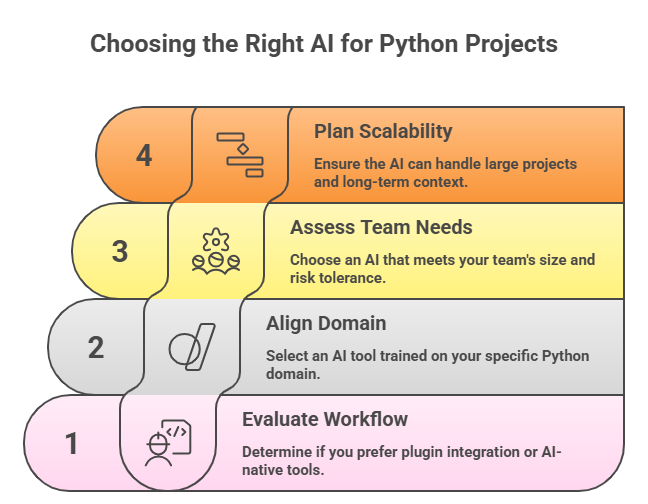
You can compare choosing an AI tool for Python with choosing a lab partner. Some are good at quick calculations, and others excel at explaining the bigger picture. The key is to find the Best AI for Python coding that matches how you work and what you actually need.
Below, we have discussed a practical step-by-step guide to pick the best free AI for Python Coding your Python projects. These are based on recent benchmarks and developer feedback from platforms like n8n, Greptile, and Daily.dev.
Let’s study them to gain a broader idea:
Step 1: Evaluate Your Development Workflow
Before comparing tools, take a moment to think about your workflow. Do you want an AI that blends quietly into your setup, or are you open to a more AI-driven way of working?
- The Workflow Integrator or Plugin Style: If you already love your editor, like VS Code, PyCharm, or similar and don’t want to change it, plugin-style tools are ideal. Solutions like GitHub Copilot and Tabnine integrate directly into your development environment. It offers smart, context-aware suggestions that speed up coding without disrupting your flow.
- The AI-first Pioneer or Native Style: If you’re willing to rebuild your tooling for a productivity boost, then AI-native editors such as Cursor or Windsurf are good options.
These tools are designed around AI from the ground up and allow them to understand broader project contexts.
Step 2: Align the Tool with Your Python Domain
Python is a huge world. Different AI tools have spent their time studying different parts of it.
| If you are building | Try this tool | Reason to Choose |
| Data Science and ML | GitHub Copilot | It has been trained on more Pandas and NumPy code than others. |
| Web Apps (Django/FastAPI) | Cursor | The Composer mode handles the back-and-forth between models, routes, and schemas. |
| Cloud-Native or AWS | Amazon Q Developer | It knows the Boto3 library inside out and can help with serverless Lambda setup. |
| Legacy or Complex Codebase | Sourcegraph Cody | It’s a master at indexing huge, messy folders and explaining what’s actually happening. |
Step 3: Assess Team Requirements and Governance
The right AI tool depends heavily on team size and risk tolerance.
For Solo Founders and Startups: You need Velocity. Tools like Windsurf act like junior developers. They can handle tasks like writing unit tests while you focus on the big ideas.
- For Mid-sized Teams: You need Consistency. Look for tools that let you share carousels. This ensures the AI follows your team’s specific Python style guide, so everyone’s code looks the same.
- For Big Enterprises: You need Safety. Go with Tabnine or GitHub Copilot Enterprise. They offer Zero-Data Retention. This means they don’t use your private code to train their public models and can even run enatirely on your own private servers.
Step 4: Plan for Scalability and Long-Term Context
Python projects are growing fast. If your AI only sees 500 lines of code, it will eventually get confused and suggest things that break your imports.
- For Big Projects: You need an AI with a high Context IQ, like Sourcegraph Cody or Claude Code. They use a process called “RAG” to “read” your distant files before they suggest a change.
- For Small Projects: Here, speed is the king. Windsurf’s lightning-fast response time is perfect for jumping between small and independent scripts.
Maximising Productivity with AI Python Tools
To truly maximise your productivity in 2026, you shouldn’t just use AI to write more code; you should use it to eliminate the work you hate doing. While AI can generate code up to 40% faster, the real “pro” move is using it to collapse the time spent on debugging, testing, and documentation.
1. Adopt the Agentic Mindset
One of the most common productivity mistakes is using AI only for single-line suggestions or autocomplete. In 2026, high-performing teams are moving forward and adopting agentic workflows.
Instead of asking the AI to write a function, you can describe an entire feature. With tools like Windsurf or Claude Code, you can prompt:
“Create a new API endpoint in routes.py, define the Pydantic model in schemas.py, and generate a migration script.”
This approach turns the AI into an execution partner. You start focusing on architecture and intent while the AI handles cross-file boilerplate and setup work. With a Data Science Bootcamp with AI, you can learn how to write prompts that command these agents to build entire scrapers and bots in minutes.
2. Audit Your Code with Dual-model Logic
A hidden productivity drain in 2026 is trust. Recent data shows that AI-generated pull requests often sit in review much longer because developers are cautious about correctness.
After generating code with one model, run it through a second one. For example, if you used GPT-4o to generate the code, ask Claude 3.7 or other review engine:
“Identify logical errors, security risks, edge cases, or off-by-one mistakes in this code.”
This dual-model approach catches hallucinations early, before they ever reach a human reviewer. The result is faster approvals, higher confidence, and a reputation for clean, reliable Python code.
3. Automate the Verification Bottleneck
Senior Python developers often spend up to 50% of their time writing unit tests and docstrings. This is a massive drain on creativity; however, it is where AI has a 96% success rate.
Use a Test-Driven Prompting approach and feed your logic to the AI and command it to:
“Write five Pytest cases, including edge cases for null inputs, large datasets, and boundary conditions.”
Tools like Bito AI or PyCharm AI can even auto-generate your code and inline documentation by analysing your actual call flows.
4. Leverage Index-aware Context
AI productivity dies when the model suggests a function you’ve already written in another file. To avoid this, you must ensure your tool, whether it’s Cursor or Sourcegraph, has fully indexed your local repository. When prompting, use specific “Mentions” or file references:
This ensures the AI stops guessing and starts following your team’s specific “dialect” of Python; it dramatically reduces the time you spend fixing its “generic” mistakes.
Conclusion
At the end of the day, the best AI for Python coding is the one that quietly makes your day easier. Maybe that means fewer bugs slipping into production. Maybe it’s faster to pull requests. Or maybe it’s finally not having the test coverage and documentation.
The smartest developers in 2026 aren’t trying to replace themselves with AI. They’re using tools to handle the boring parts, double-check their work, and keep projects moving without burning out.
Python will keep evolving. AI tools will keep getting better. Your job is simple. You have to just pick the assistant who works the way you do. We believe your time is valuable, so we train you to focus on high-stakes strategy while the algorithms do the heavy lifting.
Frequently Asked Questions
1. Can AI tools help debug Python code automatically?
Yes. AI tools can spot syntax errors, logical issues, and edge cases quickly. Platforms review code contextually, suggest fixes, and even explain why bugs happen. They also save hours of manual debugging.
2. Which AI tool is best for learning Python as a complete beginner?
Beginner-friendly AI tools explain code in plain language and suggest improvements step by step. Skillify Solutions is great for learning because it helps you understand why code works, not just what to type.
3. Will AI replace Python developers in 2026?
No. AI won’t replace developers, but it will replace repetitive tasks. Python developers who use AI tools will be more productive, while creativity, architecture, and decision-making remain in human skills.
4. Can AI tools refactor legacy Python code?
Absolutely, AI can analyse large, messy codebases and suggest cleaner, modern structures. Tools help refactor legacy Python safely by understanding dependencies and existing patterns.